 Citerank
AI Overview Citation Intel: a no-setup AI citation audit
AI Overview Citation Intel is Citation Tracker with no keyword list needed. It reads your site, works out the keywords it should be visible for, then checks Google AI Overviews and the AI engines for each and reports citations, competitors and opportunities.
Step by step
- Open AI Overview Citation Intel #
Find it under AI Visibility, Engines, in the left sidebar.
- Enter your domain #
That is all it needs. The keywords are worked out from your site.
- Optional: use your own DataForSEO account #
If you would rather the searches ran on your own DataForSEO billing, enter its API login and password.
- Run it #
It derives keywords, checks AI Overviews for each, identifies competitor citations and scores the opportunities.
- Take the keywords into tracking #
Move the keywords that matter into Prompt Tracking or Citation Tracker so you measure them over time.
Why it matters#
The hardest part of measuring AI visibility for a new site is knowing what to measure. This tool removes that step: it reads the site, decides what it should be found for, and runs the full citation analysis. It is the right first run for a new client or a site you do not know well.
What it checks#
- Keywords from your site: an AI reads the site and derives the keywords and questions it should be visible for.
- Google AI Overviews: a live Google search for each keyword, recording whether an AI Overview appears and whom it cites.
- AI engines: the same keywords asked of Gemini, Perplexity, ChatGPT, Claude and Grok, recording whether you are cited.
- Competitors and opportunities: who is cited where you are not, and which keywords are closest to winnable.
Reading the results#
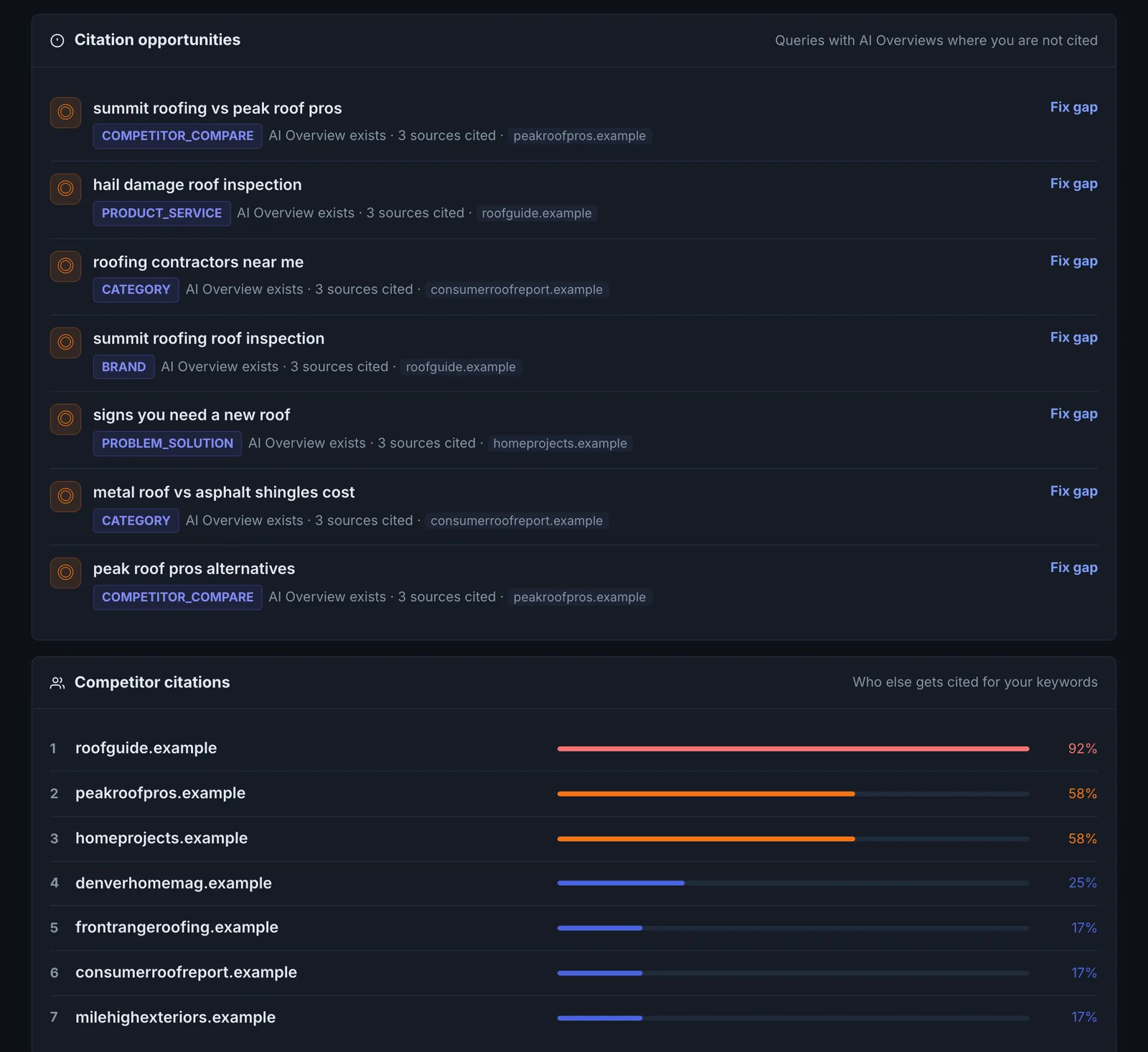
The report has the same sections as Citation Tracker: a score summary, citation intelligence, top opportunities and keyword-level results. Two extra things to check:
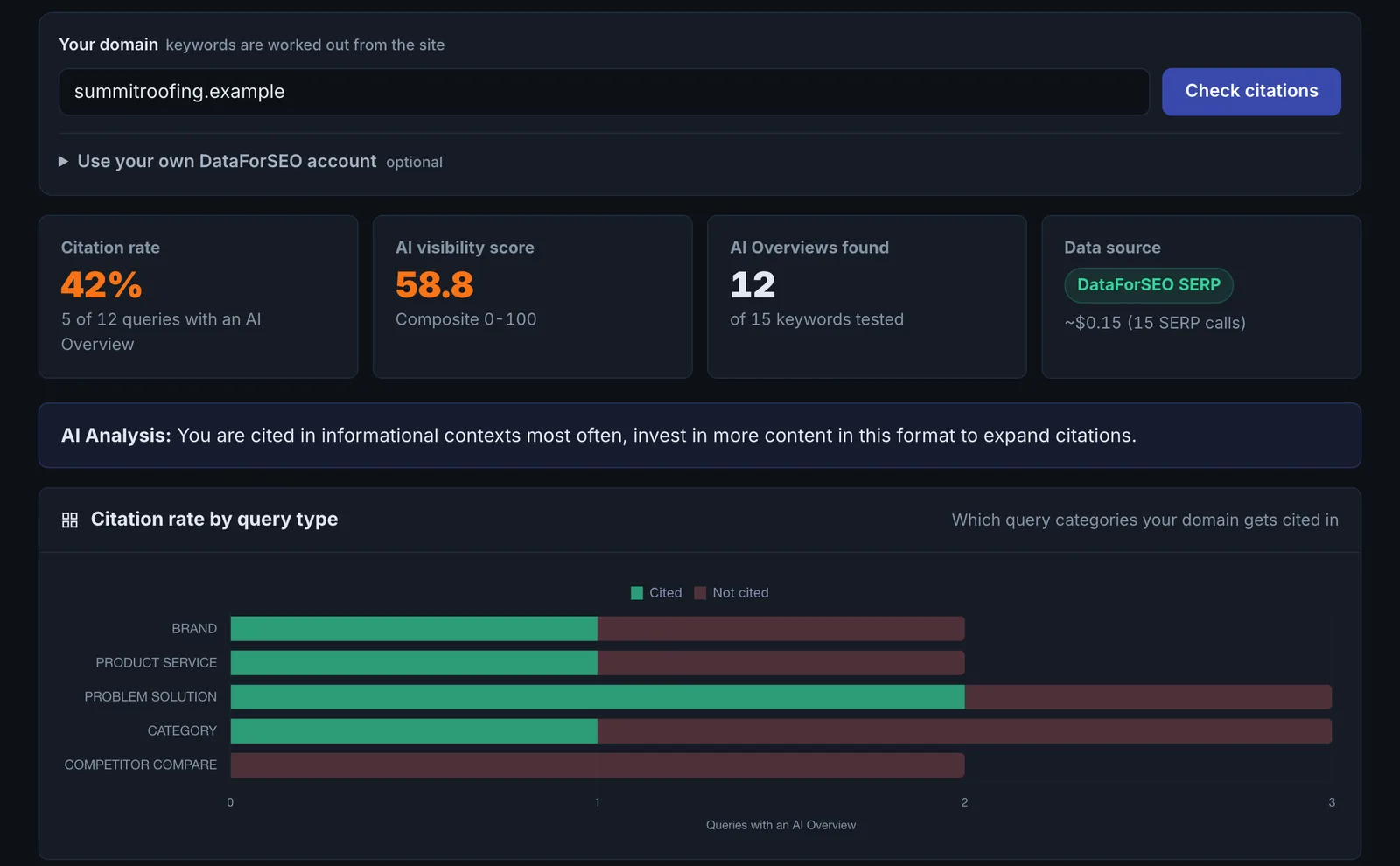
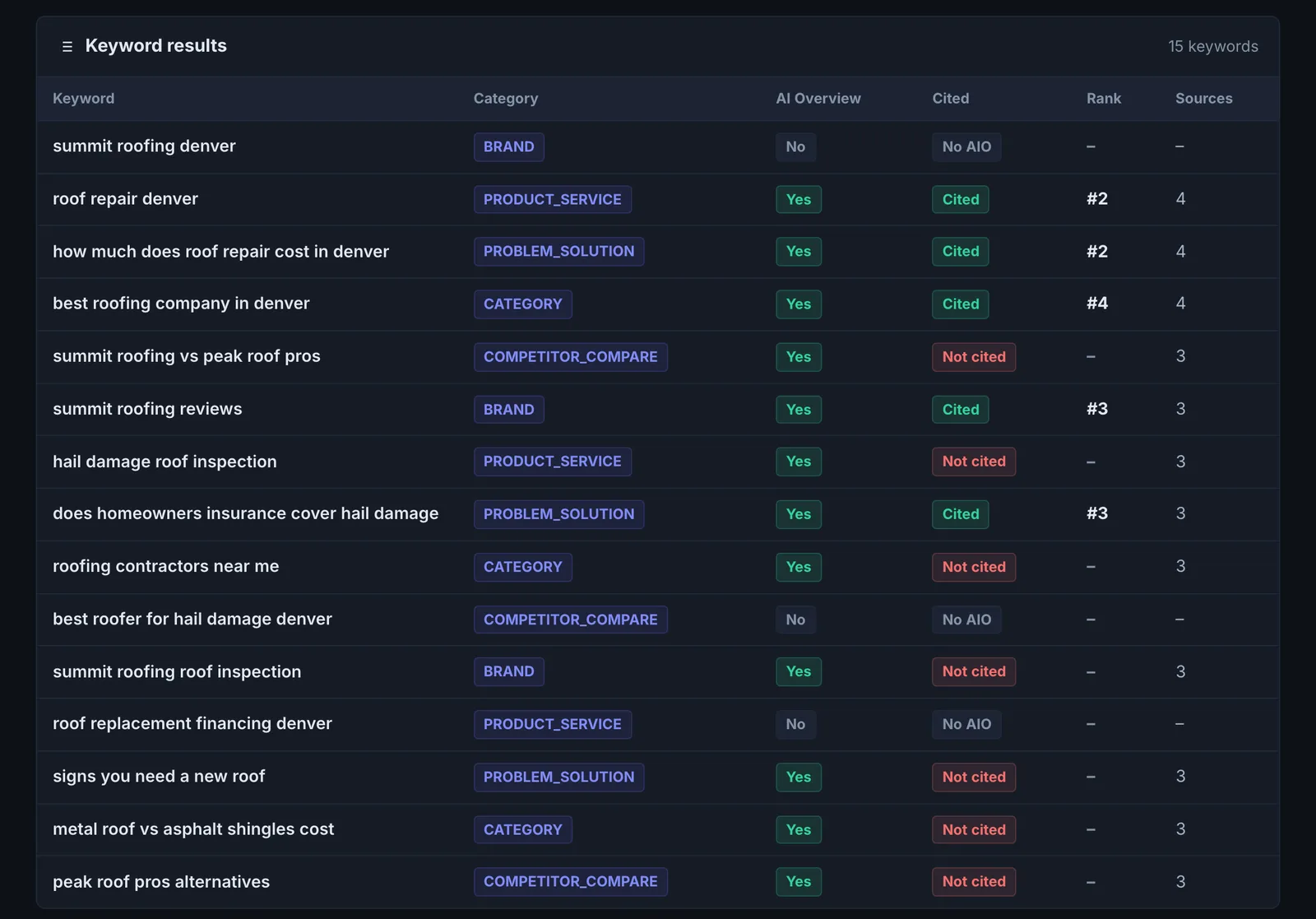
- The derived keywords themselves. If they do not match what you sell, the site is not communicating its focus clearly, which is a finding in its own right.
- AI Overview coverage. The share of your keywords that trigger an AI Overview tells you how much of your search demand is already answered by AI.
Implementing the fixes#
- Wrong keywords derived: make your home page title, H1 and opening paragraph state exactly what you do and for whom, and add Organization or LocalBusiness schema.
- Opportunities: work them as in Citation Tracker: compare the winning page, fix your page, re-run.
- Keep measuring: copy the keywords worth keeping into Prompt Tracking.
Worked example#
A home-security installer enters its domain without keywords. The tool derives 12, and four of them are about "smart home automation", a service the company stopped selling two years ago.
That is the first finding: the site still has a large automation section, so AI reads the company as an automation business. The rest of the report shows AI Overviews on 8 of 12 searches, with the company cited on 1.
The fixes: the automation pages are redirected to the security pages, the home page's opening paragraph and Organization description are rewritten around security installation, and the run is repeated. The derived keywords now match the business, and the Citation Tracker is set up on the 10 that matter.
Best practice#
Run it once at the start, then switch to a stable keyword list in Citation Tracker or Prompt Tracking, so later runs are comparable.
Troubleshooting
The keywords it derives are wrong #
The keywords come from how the site describes itself. If they miss what you sell, the site's titles, headings and opening paragraphs are not saying it clearly. Fix that first. To measure your own list right away, use Citation Tracker, where you enter the keywords.
The tool needs a paid plan #
The app saysCitation Tracker requires a paid plan
This tool runs on the Citation Tracker engine, so it needs Starter or above.
The site could not be read #
Keywords cannot be derived from a site that blocks the crawler or renders in the browser. Allow CiterankBot, or enter keywords in Citation Tracker. See Common problems.
Not listed here? See Common problems for limits, checks, plans and pages that cannot be read.
Questions
How is this different from Citation Tracker? #
How many keywords does it check? #
Does it use checks? #
Something here does not match what you see in the app? Tell us and we will fix the guide.