 Citerank
View as AI Crawler: see a page the way GPTBot, ClaudeBot and PerplexityBot do
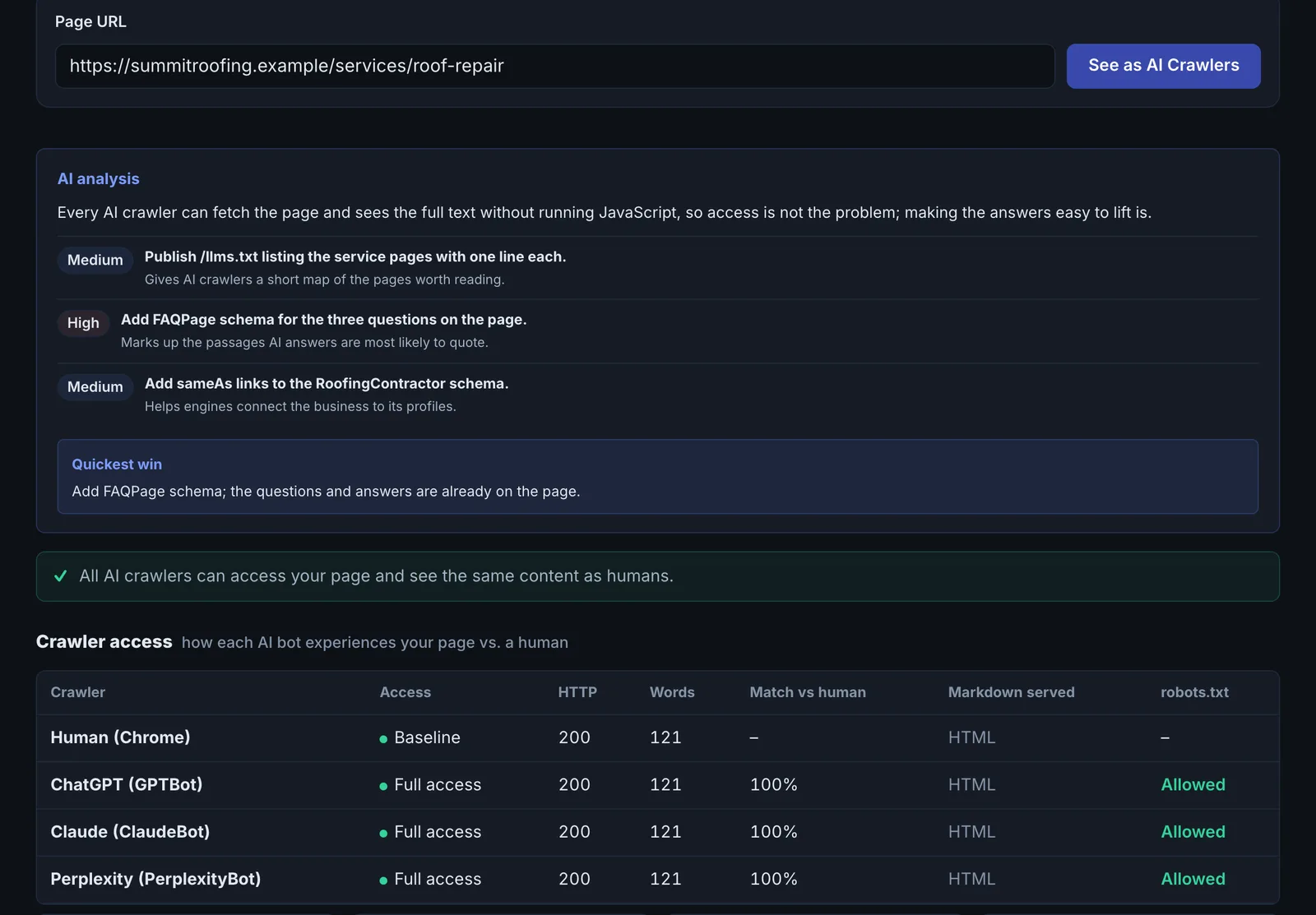
View as AI Crawler fetches a page as a normal browser and as GPTBot, ClaudeBot and PerplexityBot, then shows whether each is allowed, whether they get the same content, what structure they can read, and the page as clean Markdown.
Step by step
- Open View as AI Crawler #
Find it under Site Audit, AI Access, in the left sidebar.
- Enter a URL #
Paste the full URL of the page.
- Run it #
The page is fetched as a browser and as each AI crawler, and robots.txt is checked for each.
- Compare #
Check blocked status, content size and similarity between the browser and each crawler.
- Export as Markdown #
Use the Markdown export to see exactly the text an AI model would work from.
Why it matters#
Many sites block AI crawlers without knowing it: a robots.txt rule copied from a blog post, a firewall bot rule, a CDN challenge page. The site looks fine in a browser, so nobody notices that ChatGPT and Claude get an error page. This tool shows the difference in under a minute.
What it checks#
- robots.txt rules for GPTBot, ClaudeBot and PerplexityBot: allowed or blocked.
- A live fetch as each crawler, compared with a normal browser fetch: response, content type, size and text similarity (a cheap cloaking detector).
- Structure an AI extracts: headings, main content and the signals that make a page readable for AI.
- Clean Markdown of the page, the format LLMs work best with.
Reading the results#
- Blocked in robots.txt: the crawler is told not to read the page.
- Allowed but a different, small response: a firewall or bot protection is blocking it in practice.
- Similar content: good. The crawler sees what users see.
- Thin Markdown: the page relies on JavaScript or images for its content.
Implementing the fixes#
| Finding | Fix |
|---|---|
| Blocked in robots.txt | Remove the Disallow for that crawler (or add Allow: /). Decide deliberately: search and answer crawlers (OAI-SearchBot, Claude-SearchBot, PerplexityBot) bring citations. |
| Blocked by a firewall or CDN | Allow-list verified AI crawlers in Cloudflare (Verified Bots) or your WAF, rather than challenging them. |
| Thin Markdown | Render key content in the HTML (server-side), use real text instead of text in images, and use proper headings. |
Worked example#
A SaaS company checks its pricing page.
- GPTBot: allowed in robots.txt, but the response is a 1 KB challenge page instead of the 80 KB page users get.
- ClaudeBot and PerplexityBot: same.
- Normal browser: the full 80 KB page.
The Cloudflare "Bot Fight Mode" setting is challenging every unknown bot. Turning on Verified Bots allow-listing (which checks that a request claiming to be GPTBot really comes from OpenAI) lets the real crawlers through while still blocking scrapers. The company then checks its server logs for real GPTBot visits returning 200, because, as explained under Troubleshooting, the tool's own GPTBot request will still be challenged by that kind of rule.
Best practice#
Run it on your home page and your top three money pages whenever robots.txt, the CDN or the firewall changes.
Troubleshooting
It says a crawler is blocked, but your firewall allows that crawler #
The tool sends each crawler's user agent, but from Citerank's servers, not from OpenAI's, Anthropic's or Perplexity's. Firewalls that verify crawlers by IP address (Cloudflare Verified Bots, many WAFs) correctly treat it as an impostor, while the real crawler is let through. Confirm with your server or CDN logs: look for the real crawler's visits returning 200. If the firewall blocks on user agent alone, the result is accurate and the real crawler is blocked too.
Every crawler gets the same small response #
A security check is being served to all bots, or the page needs a login. Open the page in a private window. If it loads, check your firewall's bot settings.
The Markdown view is much shorter than the page #
The content is loaded by JavaScript, sits in images, or is inside tabs and accordions that are filled in after load. Put the key text in the HTML the server sends.
Not listed here? See Common problems for limits, checks, plans and pages that cannot be read.
Questions
What does a low similarity score mean? #
Why is the Markdown useful? #
Which crawlers does it test? #
Something here does not match what you see in the app? Tell us and we will fix the guide.