 Citerank
Topical Authority: do you own your topic?
Topical Authority reads the titles and headings of your crawled pages and gives an AI assessment of how completely your site covers its topic: a score and grade, covered and missing subtopics, clusters with coverage, competitor angles, the single highest-return move and a content plan.
Step by step
- Crawl the site first #
Topical Authority works from your pages' titles and headings, so run the Site Crawler on the domain first.
- Open Topical Authority #
Find it under Content, Research, in the left sidebar.
- Analyze #
Enter the domain and click Analyze Authority. Optionally state the primary topic, or let it infer one.
- Read the gaps #
Check missing topics by importance, and cluster coverage.
- Act on the priority #
Start with the priority action, then work the content plan.
Why it matters#
AI engines favour sources that cover a topic thoroughly, not sites with one good page. Topical Authority gives you a structured view of what your site covers and what it is missing, organised into clusters, so you can plan content as a set rather than one-off posts.
What it checks#
From your crawled pages' titles, H1s and H2s, an AI analysis produces:
| Output | What it is |
|---|---|
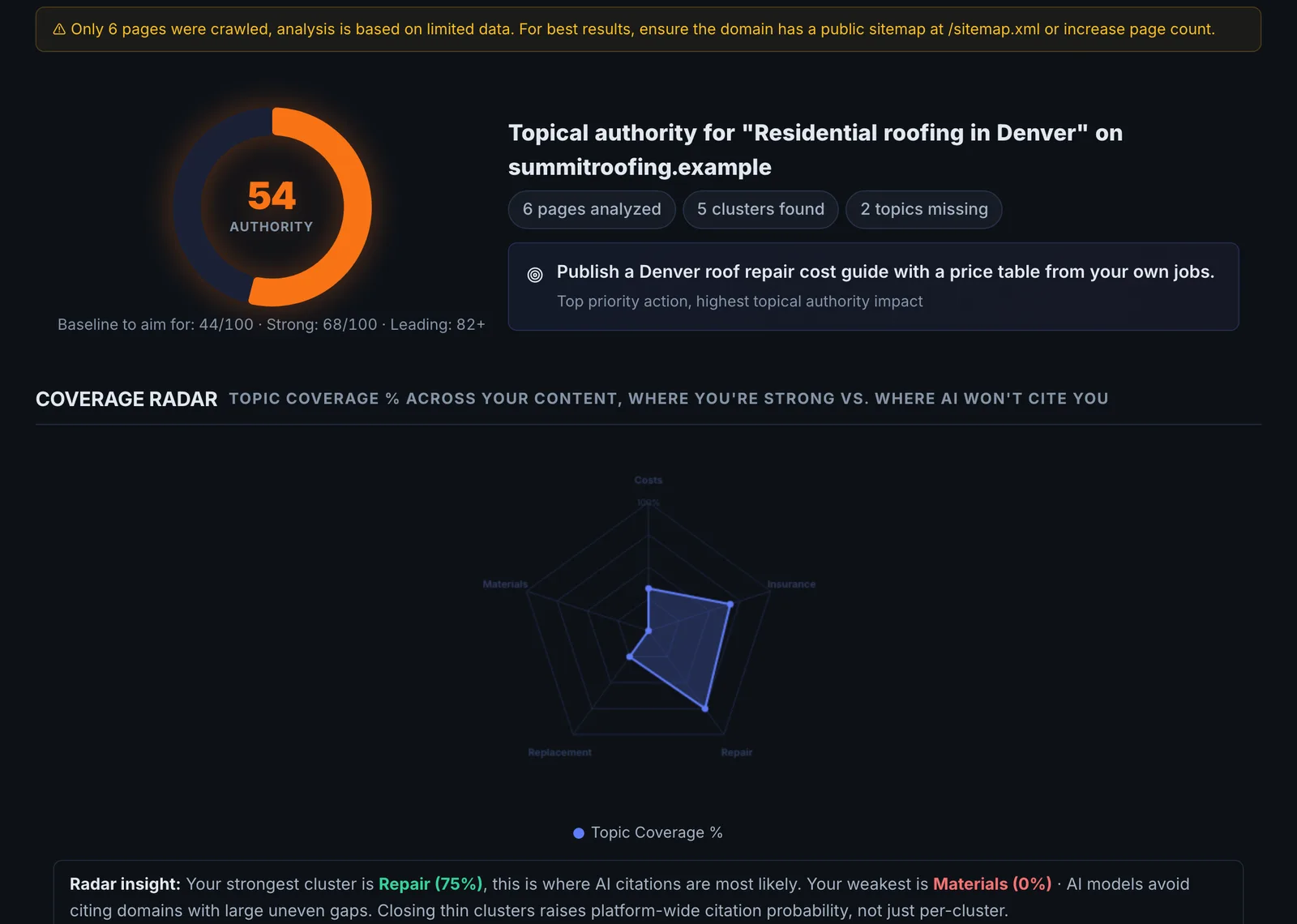
| Authority score and grade | 0 to 100: 80+ industry leader, 60 to 79 strong, 40 to 59 developing, below 40 early stage |
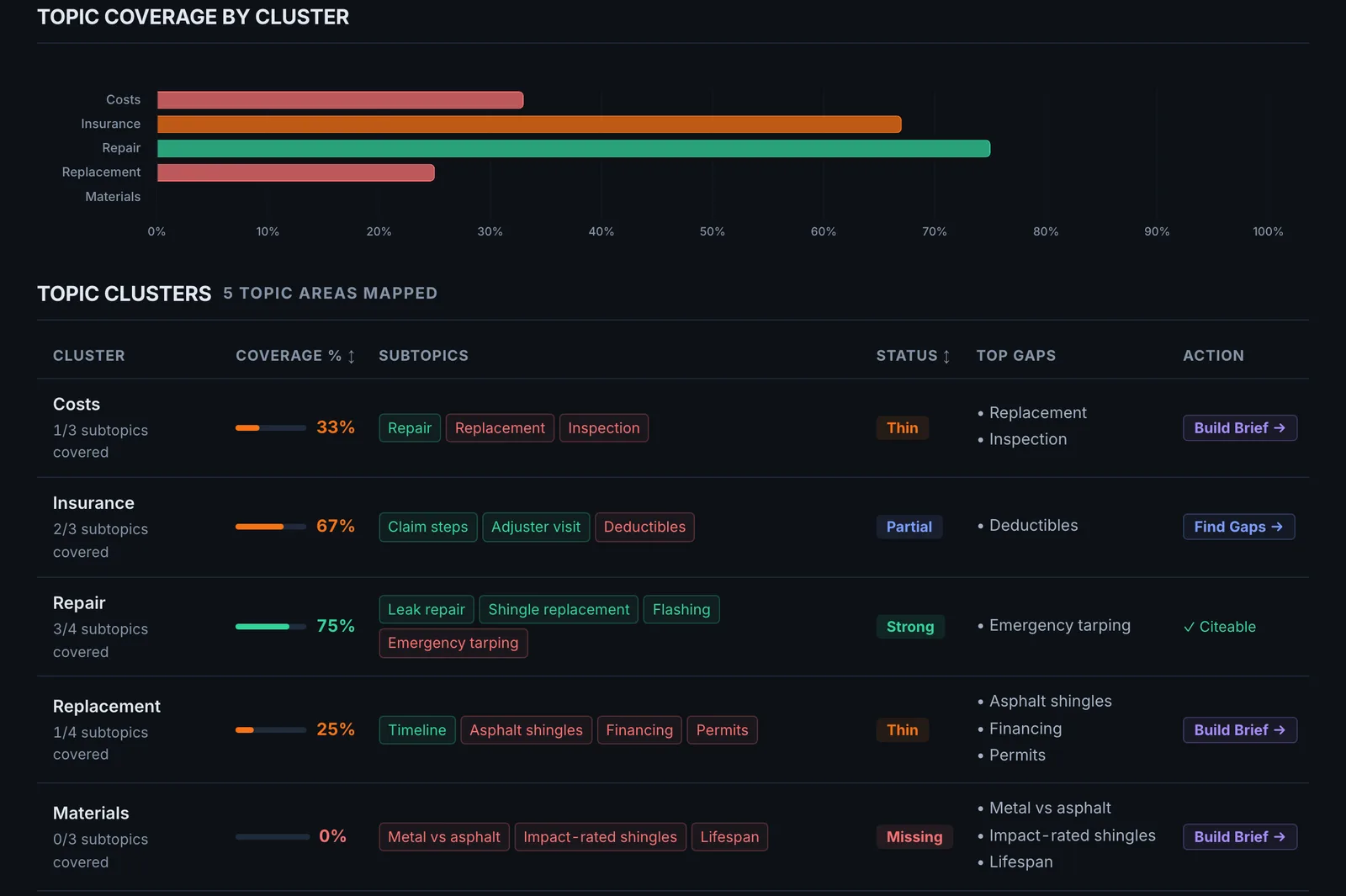
| Covered topics | Each with subtopics, coverage (strong, partial, thin), page count and one improvement |
| Missing topics | Each with importance, a search volume tier, why it matters and a short brief |
| Topical clusters | Pillar topic, subtopics and coverage percentage |
| Competitor insights | What sites in the niche typically cover that you do not |
| Priority action | The single highest-return content move |
| Content plan | The pages to create next |
Reading the results#
- Critical and high missing topics are your content backlog.
- Thin coverage on a covered topic means a page exists but is not enough.
- Cluster coverage below half means the pillar has no supporting pages.
Implementing the fixes#
- Do the priority action first.
- For each missing topic, research it with Fan-Out Mapper and write a Content Brief.
- Build clusters: one pillar page per cluster, supporting pages for subtopics, all linked to and from the pillar.
- Expand thin pages before writing new ones on the same topic.
- Re-crawl and re-run after publishing a batch.
Worked example#
A veterinary clinic crawls its site and runs the analysis.
Authority score: 46, developing. Covered: vaccinations (strong), dental care (thin: one page of 200 words). Missing, critical: senior pet care, pet nutrition. Cluster: "Dog health" has a pillar page but 25% coverage, with no pages on common conditions.
The plan: expand the dental page into a pillar with three supporting pages, write a senior pet care hub, and add five common-condition pages linked from the dog health pillar. After the next crawl, the score is 61, strong, and the clusters show the new coverage.
Best practice#
Verify missing topics against real demand (Fan-Out Mapper shows search volume) before committing to them. The score is a planning aid, not a measurement.
Troubleshooting
It asks for a site audit first #
The app saysNo page data provided. Run a site audit first to gather page data.
The analysis reads the titles and headings from a crawl. Run the Site Crawler on the domain, then open Topical Authority.
The analysis did not complete #
The app saysThe analysis could not be completed just now. Please try again; you were not charged.
Try again in a minute. No credits were taken.
The topics miss part of the site #
The crawl did not reach those pages, or capped before them. Raise the crawl's page limit, or crawl from the sitemap, then run the analysis again.
Not listed here? See Common problems for limits, checks, plans and pages that cannot be read.
Questions
Why does it need a crawl? #
Are the competitor insights from competitor data? #
Something here does not match what you see in the app? Tell us and we will fix the guide.