 Citerank
Journey Simulator: where an AI agent fails on your site
Journey Simulator simulates an AI agent completing a task on your site (for example finding information, comparing or contacting you) across five steps, scores each step, pinpoints where agents fail and gives specific fixes, with a live browser session you can replay.
Step by step
- Open Journey Simulator #
Find it under Plan & Deploy, Plan, in the left sidebar.
- Enter your site and pick a journey #
Choose the task type the agent should attempt.
- Run it #
The page signals are read, the five steps simulated and a live browser session run.
- Find the failing step #
See each step's score and where the agent fails.
- Apply the fixes #
Use the step-specific fixes, then re-run.
Why it matters#
Agents fail at a specific step: they cannot find the booking flow, cannot read the pricing, cannot submit the form. Knowing the exact step, and the code fix for it, is what makes agent readiness actionable.
What it checks#
Five-step journeys for common tasks, for example:
| Journey | Typical steps |
|---|---|
| Book Appointment | Discover the offering, locate the booking flow, execute the booking, confirm |
| Buy Product | Discover products, locate the buy flow, execute the purchase, confirm delivery |
| Get Quote | Identify the offering, find how to get a price quote, request it |
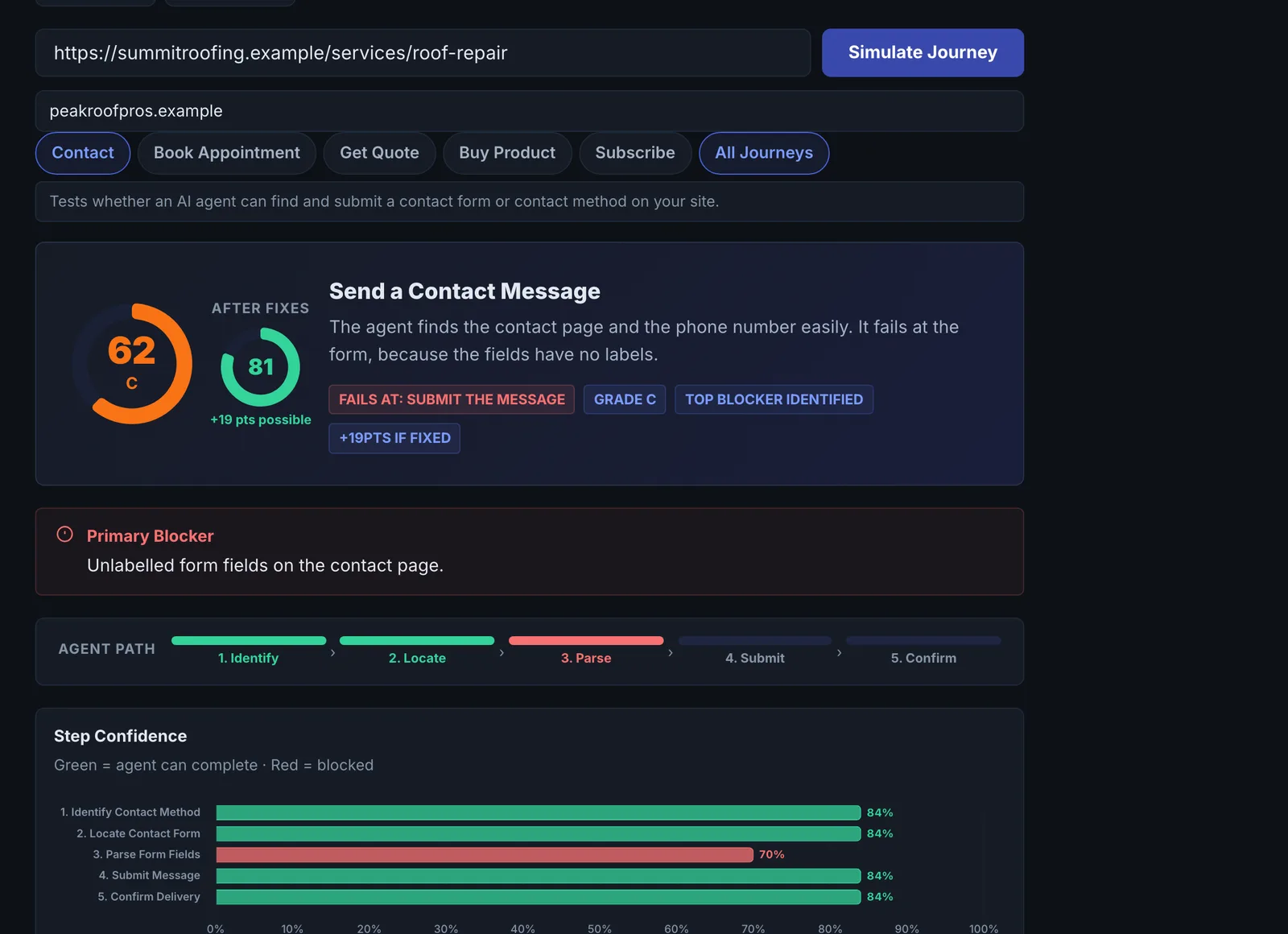
| Contact | Identify the contact method, locate the contact form, submit |
For each step it reads the page signals, simulates the agent and scores its confidence. A live real-browser session runs alongside so you can replay what happened, with an accessibility-tree snapshot.
Reading the results#
- Journey score and whether the journey is completable.
- Primary blocker: the step where the agent fails.
- Step confidence: how sure the agent is at each step.
- Agent says: the agent's own account of what it saw.
- Journey score history shows progress over runs.
Implementing the fixes#
Each failing step comes with a specific code fix. Typical ones: label buttons and links clearly, make the booking or buy entry point a real link from the home page, replace custom widgets with native form controls, and expose actions with potentialAction (WebMCP Generator). The quick wins list is the shortest path to a completable journey.
Worked example#
A dental practice runs the Book Appointment journey.
Completable: no. Primary blocker: step 3, execute the booking. Steps 1 and 2 score high: the agent finds the services and the "Book now" link. The booking opens a third-party scheduler in a pop-up, and the replay shows the agent cannot see inside it. Agent says: "The booking button opens an overlay with no readable controls."
The fix: the "Book now" link goes to the scheduler's own booking page in a normal tab, which the scheduler supports. Re-run: completable, journey score up sharply, and the history shows the jump.
Best practice#
Run the journey that maps to your main conversion, fix its primary blocker, and re-run until it is completable. Then test it for real with the AXIS Agent Checker.
Troubleshooting
The journey fails at the first step #
The agent could not tell what the site offers. Check the home page has clear headings and text naming the services, not only images.
The flow happens in a pop-up or iframe #
Agents often cannot see inside pop-ups and iframes from other domains. Link to the flow's own page instead.
The site could not be loaded #
A firewall blocked the browser, or the address is wrong. See Common problems.
Not listed here? See Common problems for limits, checks, plans and pages that cannot be read.
Questions
How does it differ from the AXIS Agent Checker? #
Can I run every journey at once? #
Does it submit a booking or order? #
Something here does not match what you see in the app? Tell us and we will fix the guide.