 Citerank
SERP Features Tracker: AI Overviews, snippets and PAA for your keywords
SERP Features Tracker runs a live Google search for up to 10 keywords and records which features appear (AI Overview, featured snippet, People Also Ask, image and video results, local pack, sitelinks) and whether your domain holds them.
Step by step
- Open SERP Features Tracker #
Find it under AI Visibility, Engines, in the left sidebar.
- Enter your domain #
Type your domain. The search locale is chosen to match it.
- Add keywords #
One per line, up to 10. Each is one live search.
- Run it #
Each keyword is searched live and every feature on the page recorded.
- Use the opportunity matrix #
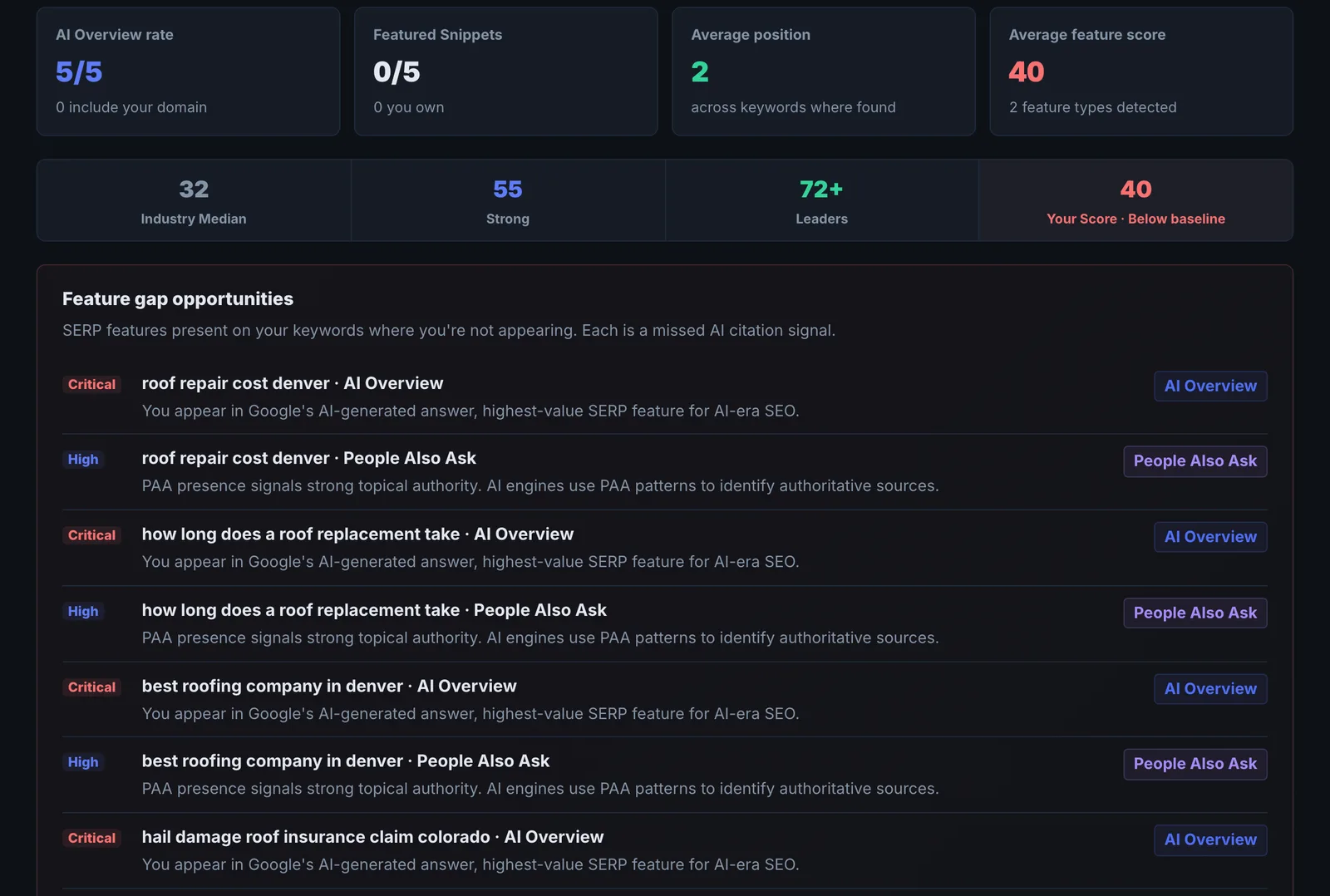
Find features that appear for your keywords but do not include you.
Why it matters#
AI Overviews, featured snippets and People Also Ask now take much of the space and the clicks on a Google results page. Knowing which features appear for your keywords tells you what format wins there, and whether the opportunity is an AI Overview, a snippet or a local pack. It is also the honest check of whether an AI Overview appears at all before you optimise for one.
What it checks#
For each keyword, a live Google search in the locale that matches your domain (top 30 results), recording:
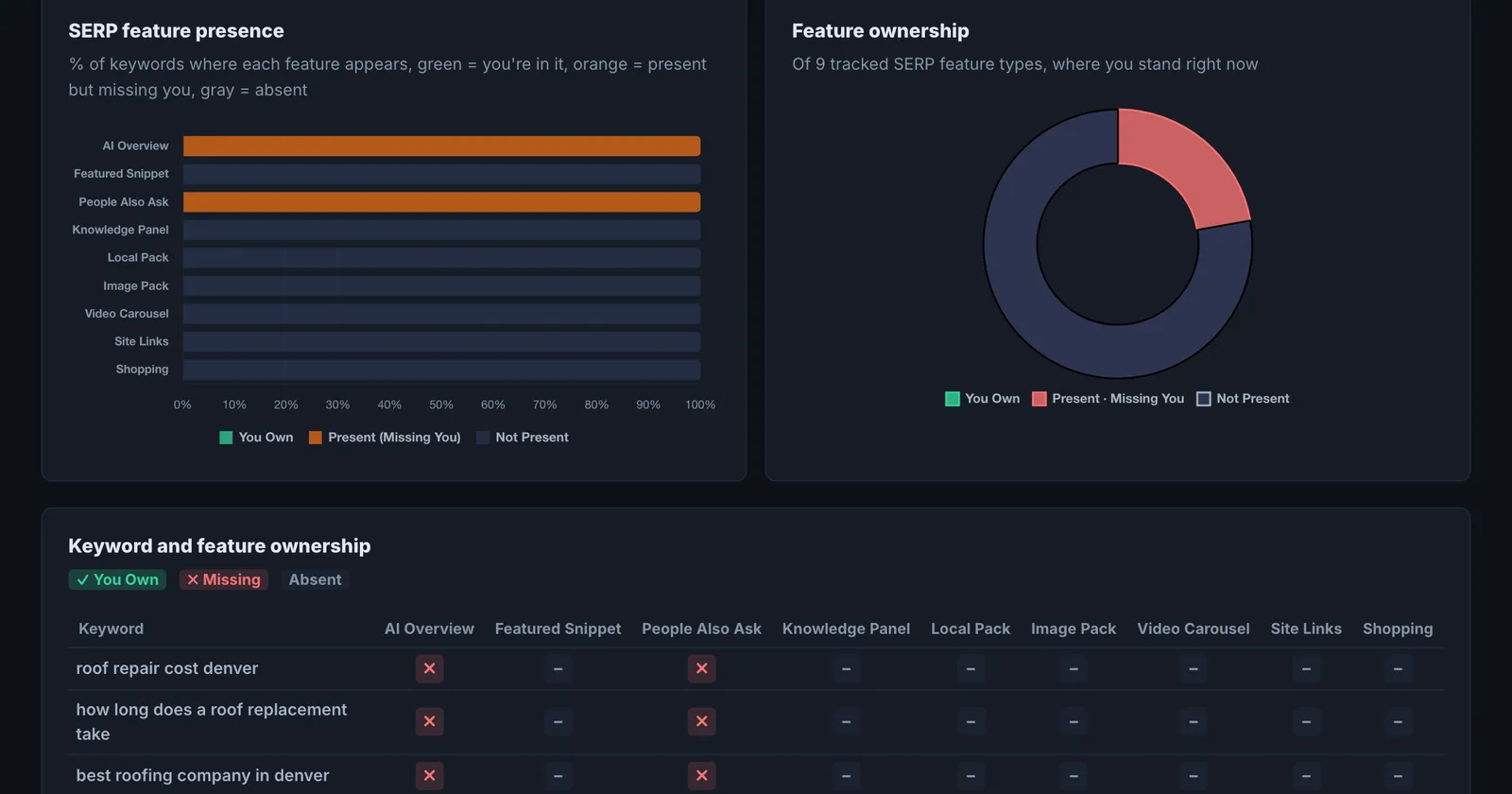
- Which features appear: AI Overview, featured snippet, People Also Ask, image pack, video, local pack, sitelinks and others.
- Whether your domain holds each feature.
- A feature score per keyword and an AI summary with priorities and a quick win.
Reading the results#
- AI Overview present, you absent: your highest-value gap. See who is cited and work the page.
- Featured snippet held by someone else: a format problem as often as a content one. The winner usually answers in a tight paragraph, list or table right under a matching heading.
- People Also Ask: each question is a sub-topic searchers have. Answer them on your page.
- Local pack: a Google Business Profile matter, not page content.
- Opportunity matrix: features present in the results but without you, keyword by keyword.
Implementing the fixes#
| Feature you lack | What to do |
|---|---|
| AI Overview | Answer the query directly in the first lines of a section with the query as the heading; add specifics and schema. See AI Overview Tracker. |
| Featured snippet | Put a 40 to 60 word answer, numbered list or table directly under a heading that matches the query. |
| People Also Ask | Add an FAQ section with those exact questions, answered briefly, plus FAQ schema. |
| Video | Publish a short video on the topic with a descriptive title, and add VideoObject schema on the page that embeds it. |
| Local pack | Complete and verify your Google Business Profile, match categories to the query, and earn reviews. |
Worked example#
A garden centre checks 6 keywords.
- "when to plant tulip bulbs": AI Overview present, citing a national gardening magazine. A featured snippet is held by a seed company with a 4-row table of months by region.
- "garden centre near me": local pack present. The garden centre is in it.
- "how to prune roses": People Also Ask with 4 questions, none answered on the centre's rose care page.
The fixes: the bulb planting guide gets a month-by-region table right under a heading that matches the search, and the rose care page answers the four PAA questions as subheadings. Re-check a month later: the featured snippet for tulip bulbs has moved to the centre, and the AI Overview cites it alongside the magazine.
Best practice#
Run it on your top keywords quarterly. SERP layouts change, and a feature that appears for the first time is often the quickest win available.
Troubleshooting
Too many keywords #
The app saysAt least 1 keyword required (max 10)
Each run takes 1 to 10 keywords. Split longer lists across runs.
The results look like another country's #
The search runs in the locale that matches your domain. A .com is checked in the United States. For another market, use the country domain or treat the results as a guide.
Starter runs are used up #
The app saysof this month's runs on your plan. The allowance resets every 30 days, or upgrade for more.
Starter includes 20 runs a month. Wait for the reset, or upgrade.
Not listed here? See Common problems for limits, checks, plans and pages that cannot be read.
Questions
Is this a live check of Google AI Overviews? #
Which features are detected? #
Does it use checks? #
Something here does not match what you see in the app? Tell us and we will fix the guide.