 Citerank
Entity Registry: one identity for each entity, site-wide
The Entity Registry stores the key entities of a project (your organisation, people, services, places) with one @id, name, type, description and sameAs links each. The schema generators use it so every page refers to each entity the same way.
Step by step
- Open Entity Registry #
Find it under Schema & Entities, Coverage, in the left sidebar. The project follows the selected client.
- Add your core entities #
Add your Organization, key people, main services and locations with name, type and @id.
- Add sameAs links #
One URL per line: Wikidata, LinkedIn, Google Business Profile and other official profiles.
- Generate schema with it #
Pick the registry project in the Bulk Schema Generator so generated graphs reuse these @ids.
- Keep it current #
Edit entries when names, people or services change.
Why it matters#
If your home page calls you "Acme Roofing LLC" with one @id and your service pages call you "Acme" with another, engines see two entities. The registry is the single source of truth that keeps every page consistent, which is what builds a strong, unambiguous entity.
What it checks#
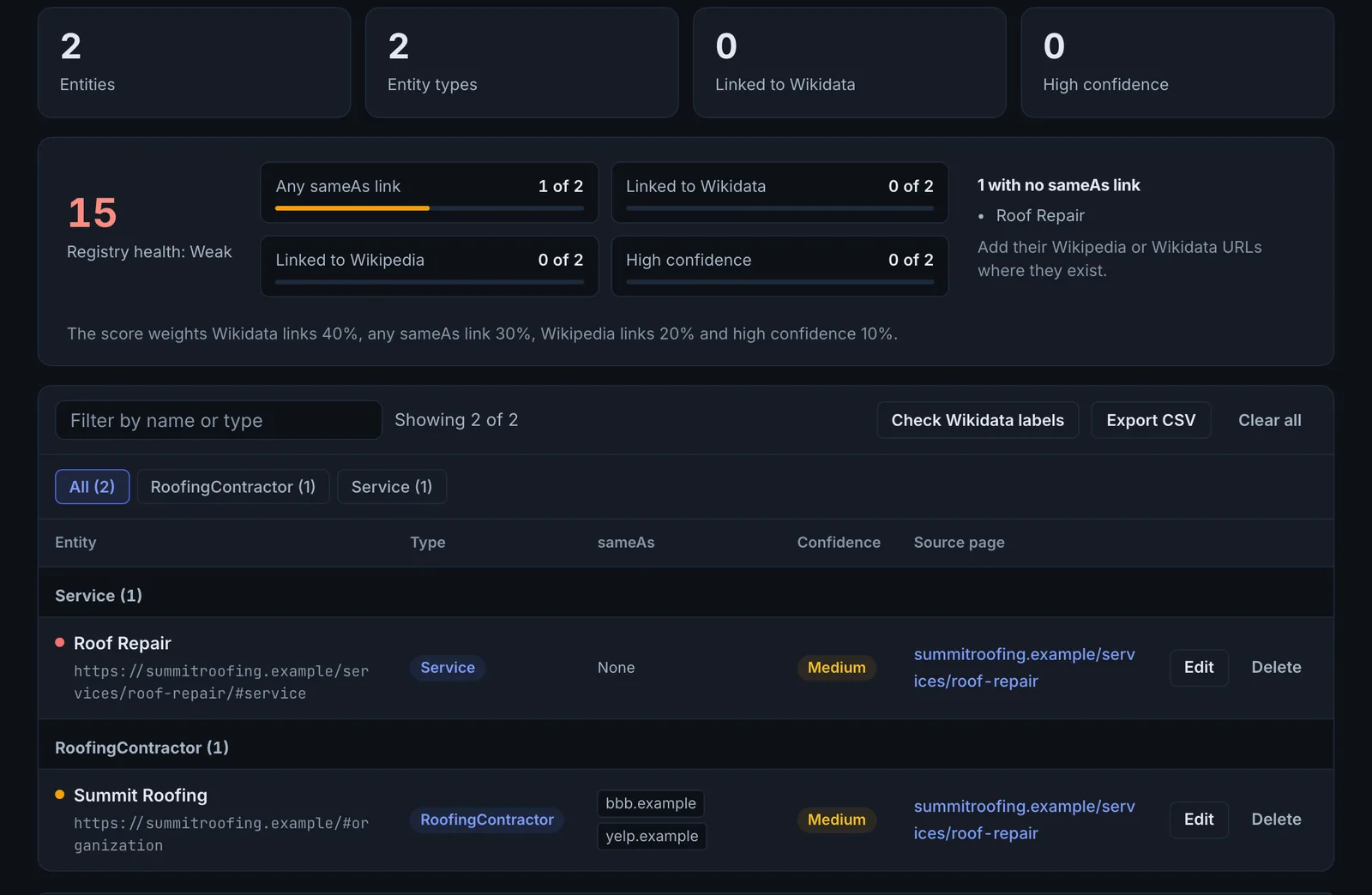
It stores entities and shows how they connect, and flags where the same thing is described two different ways across your site.
Reading the results#
- Duplicates: the same entity under different names or @ids.
- Missing sameAs: entities not tied to any external profile.
- Low confidence: entities extracted automatically that need review.
Implementing the fixes#
- Merge duplicates into one entry with one @id.
- Add sameAs links for the Organization and key people.
- Regenerate schema with the registry so every page uses the same identities.
Worked example#
An agency sets up the registry for a law firm before generating schema.
It adds: the firm (Organization, @id https://example-law.com/#org, sameAs to LinkedIn and the state bar listing), three partners (Person, each with @id on their bio page), and four practice areas (Service). The registry flags a duplicate: "Example Law LLP" and "Example Law Firm" were both extracted as organisations. They are merged into one entry with the legal name.
The Bulk Schema Generator then uses the registry, so every page refers to the firm and each partner by the same @id.
Best practice#
Set up the registry before running the Bulk Schema Generator on a site.
Troubleshooting
The registry asks you to sign in #
The app saysSign in to use the entity registry
The registry is saved to your account. Sign in to create and edit entries.
Automatically extracted entries are wrong #
Entries marked low confidence came from page text. Review them: correct the type and name, or delete them.
You are not sure which @id to use #
Use the URL of the page that is about the entity, plus a fragment: https://example.com/#org for the organisation, https://example.com/team/jane-doe#person for a person. Keep it the same forever once it is in use.
Not listed here? See Common problems for limits, checks, plans and pages that cannot be read.
Questions
Where do entries come from? #
What @id should I use? #
Does the registry change my site? #
Something here does not match what you see in the app? Tell us and we will fix the guide.