 Citerank
AI Search Reports: Google and Bing's own AI visibility data
AI Search Reports imports the only first-party records of AI search visibility: Google Search Console's Generative AI report (AI Overviews, AI Mode, Discover) and Bing Webmaster Tools' AI Performance report (Copilot and Bing answers), and shows them side by side with history.
Step by step
- Export from Search Console #
In Search Console open Performance, then Generative AI. Set the longest date range, choose Export, then Download CSV. You get a .zip.
- Export from Bing Webmaster Tools #
Open AI Performance. On each tab you want (grounding queries, pages) choose Export, then CSV.
- Open AI Search Reports #
Find it under AI Visibility, Engines, in the left sidebar, and choose the site the reports are for.
- Import all the files together #
Add the Google .zip and the Bing CSV files in one go. New imports merge with what is stored, so history builds up.
- Read the findings #
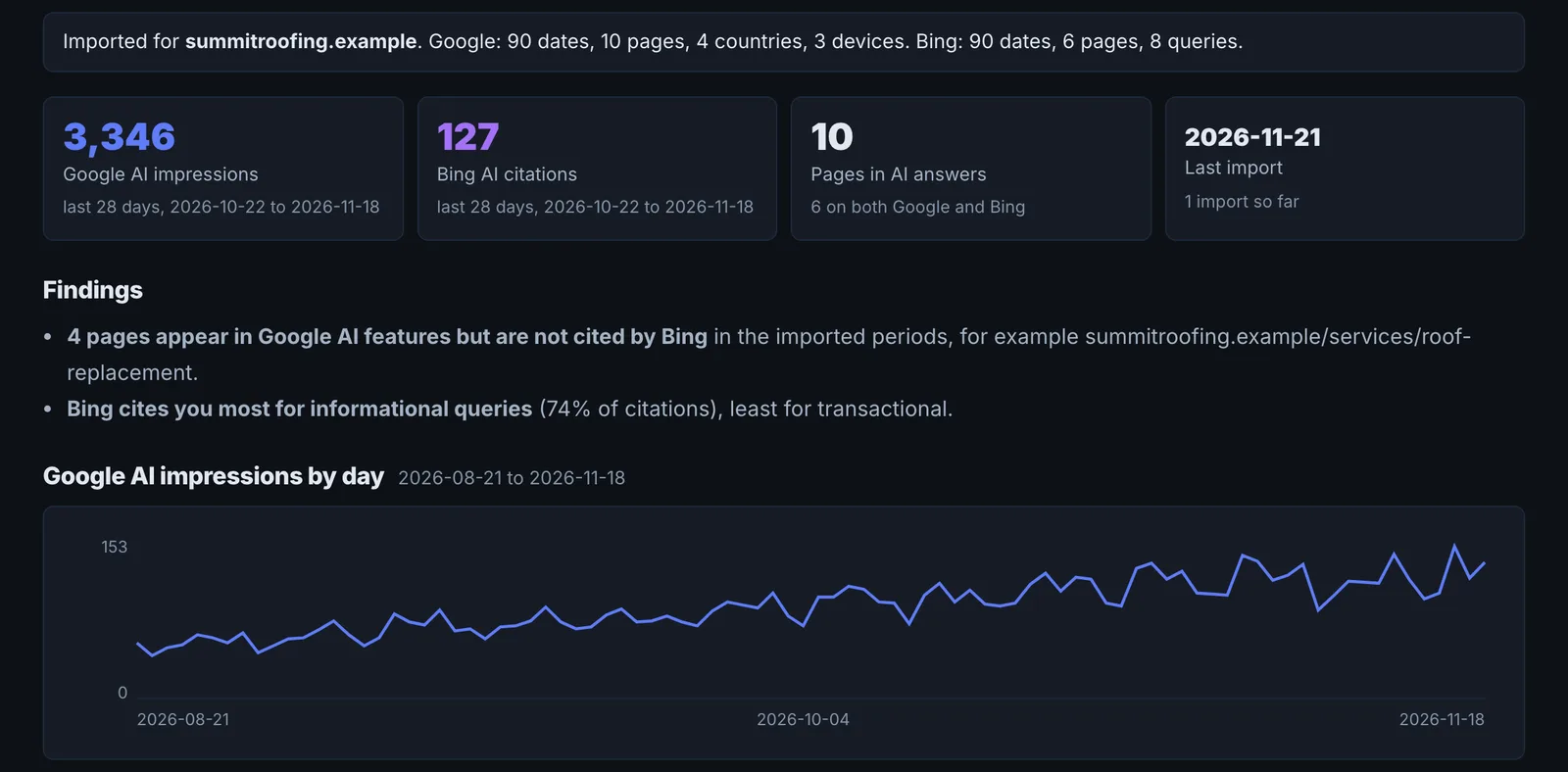
Check the findings, the daily charts, pages, Bing grounding queries, countries and devices.
Why it matters#
Every other AI visibility number is a sample: we ask the engines and record the answer. These two reports are the platforms' own records of how often your pages appeared in AI search. They are the ground truth to check everything else against, and the most credible numbers to put in front of a client.
What it checks#
- Google Search Console, Generative AI report: how often your pages were shown in AI Overviews, AI Mode and Discover, by day, page, country and device.
- Bing Webmaster Tools, AI Performance report: how often your pages were cited in Copilot and Bing AI answers, the grounding queries behind them, and the pages cited.
Reading the results#
- Findings summarise what changed and what stands out.
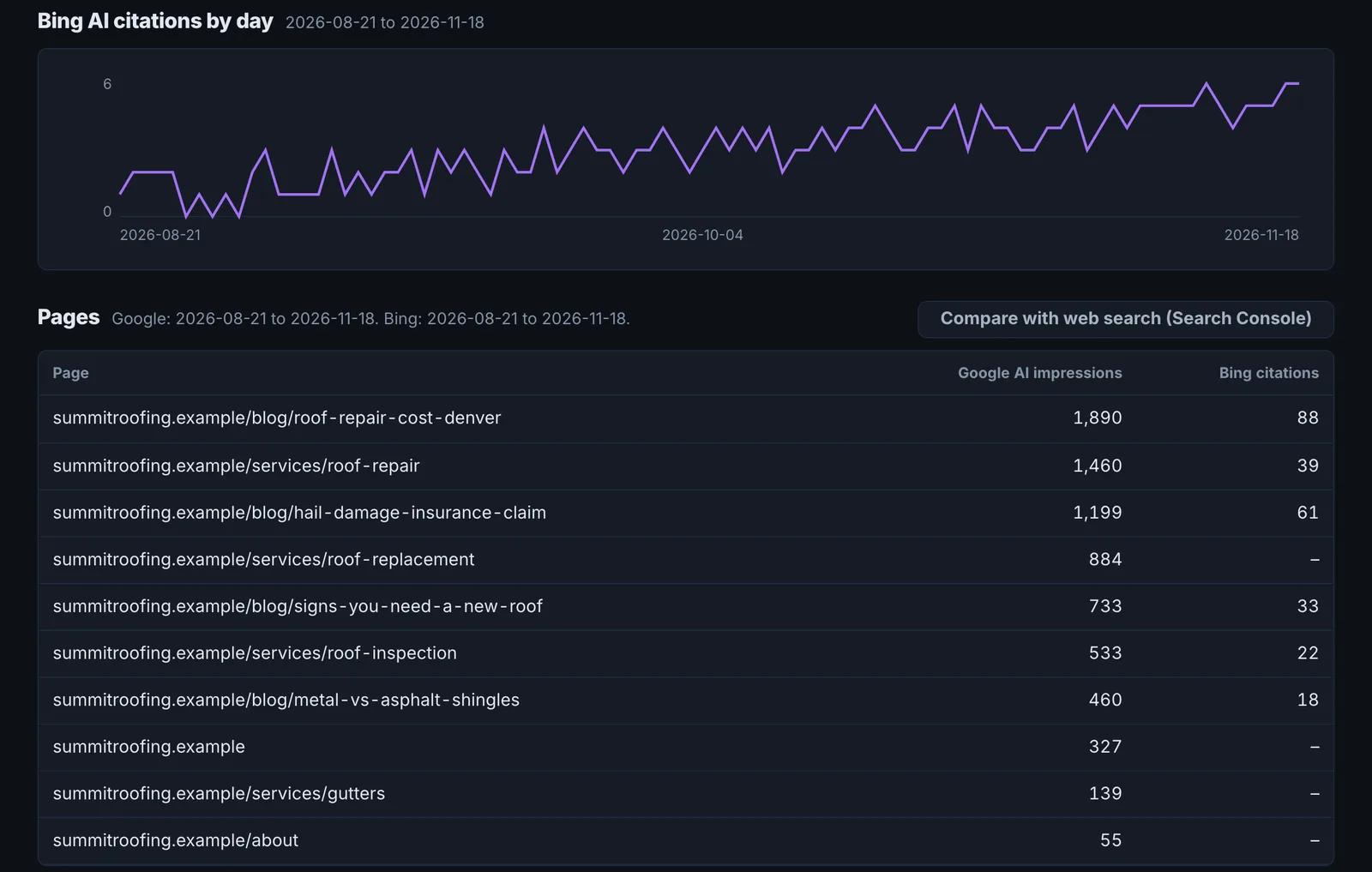
- Google AI impressions by day and Bing AI citations by day show the trend.
- Pages shows which of your pages earn AI visibility, and which do not.
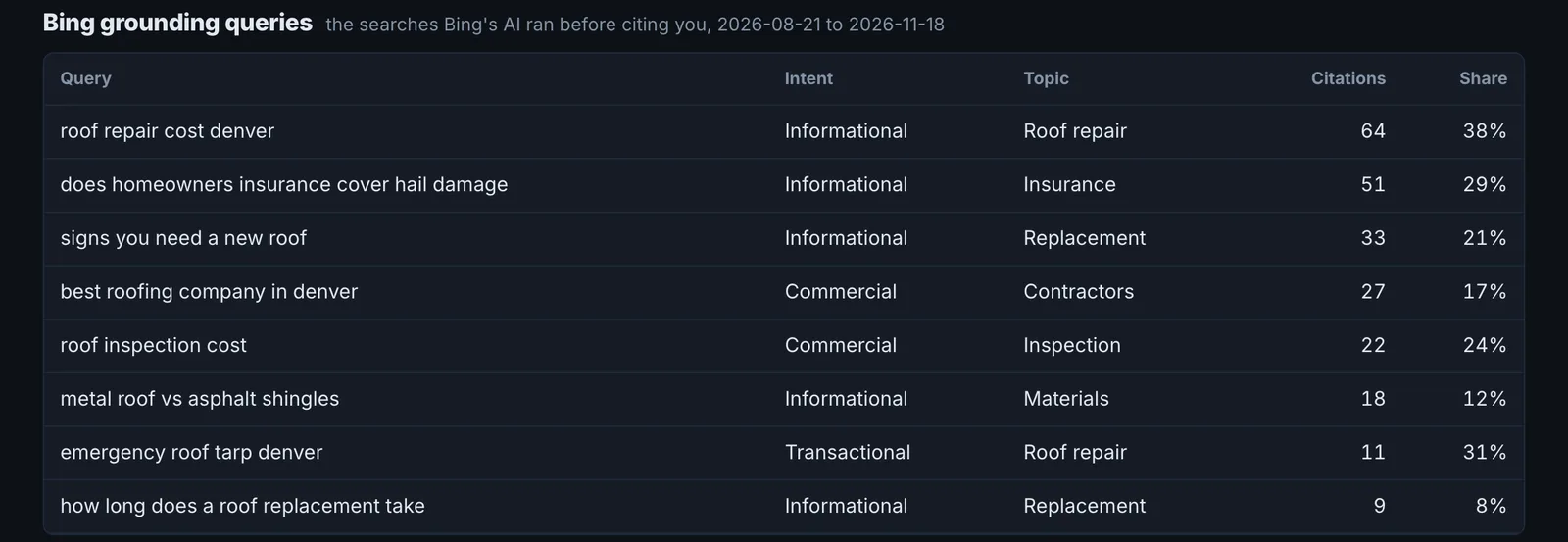
- Bing grounding queries are the searches Bing ran to answer users. These are real AI-search demand you can target.
- Import history lists what was imported, so gaps in the data are explained.
Implementing the fixes#
- Double down on the pages that earn AI impressions: keep them fresh, extend them with the sub-questions in the grounding queries, and link to them from related pages.
- Find valuable pages with no AI impressions and audit them in the Page Auditor.
- Use Bing grounding queries as a content brief: each one is a question an AI answered with or without you.
- Compare with your sampled data: if Citation Tracker shows you cited but Search Console shows no AI impressions, the query may have little volume.
Worked example#
An e-commerce site imports three months of Search Console's Generative AI report and Bing's AI Performance report.
- Google: AI Overview impressions grew 40% over the period, almost all on 6 buying-guide pages. Product pages get almost none.
- Bing grounding queries: 30 queries Copilot ran to answer users, 11 of them comparisons ("X vs Y for small kitchens") the site has no page for.
The fixes: two comparison pages built for the most common grounding queries, and the buying guides linked from the matching product categories. The next import shows both new pages cited in Copilot within five weeks, and the import history shows the dates, so the change is easy to explain to the client.
Best practice#
Import once a month with the longest date range. The tool merges imports, so you build up history beyond Search Console's own retention.
Troubleshooting
Nothing usable in the files #
The app saysNothing usable in those files. Export the Generative AI report from Search Console, or AI Performance from Bing Webmaster Tools, as CSV.
The file is from a different report, or not CSV. In Search Console, open the Generative AI report and export as CSV. In Bing Webmaster Tools, open AI Performance and export. Excel files must be saved as CSV first.
You are asked to choose a site #
The app saysChoose the site these reports are for.
Pick the project site before importing, so the data is attached to the right domain.
The import did not save #
The app saysThe reports could not be saved. Please try again.
Nothing was saved, so importing again will not create duplicates. Try again in a minute.
Not listed here? See Common problems for limits, checks, plans and pages that cannot be read.
Questions
Why not connect by API? #
Why do some Google values show as 0? #
Why does Bing show citations, not clicks? #
Can I import Excel files? #
Something here does not match what you see in the app? Tell us and we will fix the guide.