 Citerank
Training Data Audit: are you in the data AI models learn from?
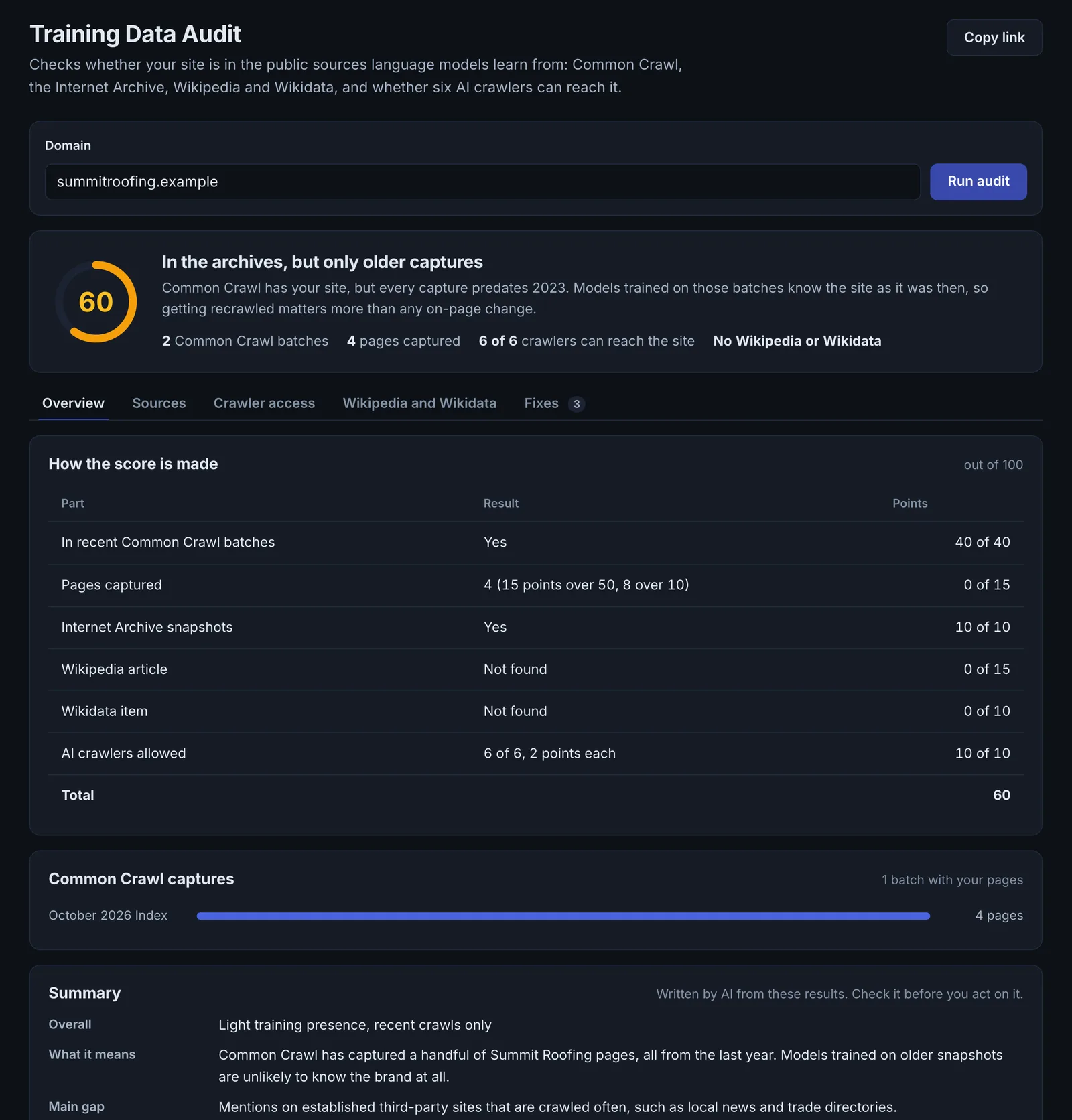
The Training Data Audit checks whether your site is in the main sources AI models learn from (Common Crawl, the Internet Archive, Wikipedia and Wikidata) and whether the training crawlers can reach it, then gives a verdict and prioritised recommendations.
Step by step
- Open Training Data Audit #
Find it under Site Audit, AI Access, in the left sidebar.
- Enter your domain #
Type your domain, for example example.com.
- Run it #
It checks the Common Crawl index, live access for each training crawler, robots.txt, the Internet Archive, Wikipedia and Wikidata.
- Read the verdict #
See where you are present, where you are missing, and which crawlers are blocked.
- Work the recommendations #
Follow the prioritised list, starting with any crawler you block by accident.
Why it matters#
When someone asks an assistant about you without web search, the answer comes from what the model learned in training. If your site never made it into the training data, the model either does not know you or knows you from other people's pages. This audit shows whether you are in the main corpora and whether you are letting the training crawlers in.
What it checks#
| Check | What it tells you |
|---|---|
| Common Crawl index | Whether your domain is in the two most recent crawls, how many pages and how fresh |
| Training crawler access | robots.txt rules and a live fetch with the real user agent for CCBot, GPTBot, ClaudeBot, PerplexityBot and meta-externalagent; robots.txt rule for Google-Extended |
| Internet Archive | Whether your site has a historical record |
| Wikipedia | Whether there is an article, one of the most heavily weighted training and grounding sources |
| Wikidata | Whether there is an entity item, the graph many models ground facts against |
It ends with a verdict and prioritised recommendations.
Reading the results#
- Blocked crawlers you did not mean to block are the urgent finding.
- Not in Common Crawl, or few pages: your site is hard to crawl, new, or blocks CCBot.
- No Wikipedia or Wikidata entry: normal for small businesses. Wikidata is the realistic one to add.
Implementing the fixes#
- Decide your policy for each training crawler, then make robots.txt match it exactly.
- Unblock CCBot if you want to be in open training data.
- Create or complete a Wikidata item if your organisation meets Wikidata's notability rules: official website, founding date, location, industry and links to your official profiles. Link it from your Organization schema with sameAs.
- Do not create a Wikipedia article about yourself. Earn coverage in independent sources; an article can follow.
- Make your pages crawlable as plain HTML so the crawlers that do visit get the content.
Worked example#
A publisher wants its articles cited by AI search but kept out of model training.
The audit shows: CCBot allowed, GPTBot blocked, OAI-SearchBot blocked, ClaudeBot allowed, Google-Extended allowed. That matches neither goal: OAI-SearchBot is ChatGPT's search crawler, so blocking it removes the site from ChatGPT search results, while two training crawlers are still allowed.
The fix: robots.txt rewritten to match the policy: allow OAI-SearchBot, Claude-SearchBot and PerplexityBot (search and answers), and disallow GPTBot, ClaudeBot, CCBot and Google-Extended (training). Re-running the audit confirms each crawler matches the policy, and View as AI crawler confirms the search crawlers get the full page.
Best practice#
Re-run after changing robots.txt or your firewall, and check the Knowledge Graph Consistency audit alongside it.
Troubleshooting
Common Crawl shows few or none of your pages #
The site is new, CCBot is blocked, or the pages are hard to crawl (JavaScript content, deep pages). Common Crawl updates in monthly snapshots, so new pages take time to appear even after you allow it.
The domain is refused #
The app saysInvalid domain
Enter the domain alone, such as example.com, without paths or spaces.
You blocked a crawler but the audit says it is allowed #
robots.txt rules are matched by user-agent name, and a more specific group overrides User-agent: *. Check for a typo in the crawler name, and that the live robots.txt (not a cached copy) contains your change.
Not listed here? See Common problems for limits, checks, plans and pages that cannot be read.
Questions
Why does Common Crawl matter? #
Should I block training crawlers? #
Why is Google-Extended not live-tested? #
Something here does not match what you see in the app? Tell us and we will fix the guide.