 Citerank
AI Rank Tracker: your position in each AI engine, over time
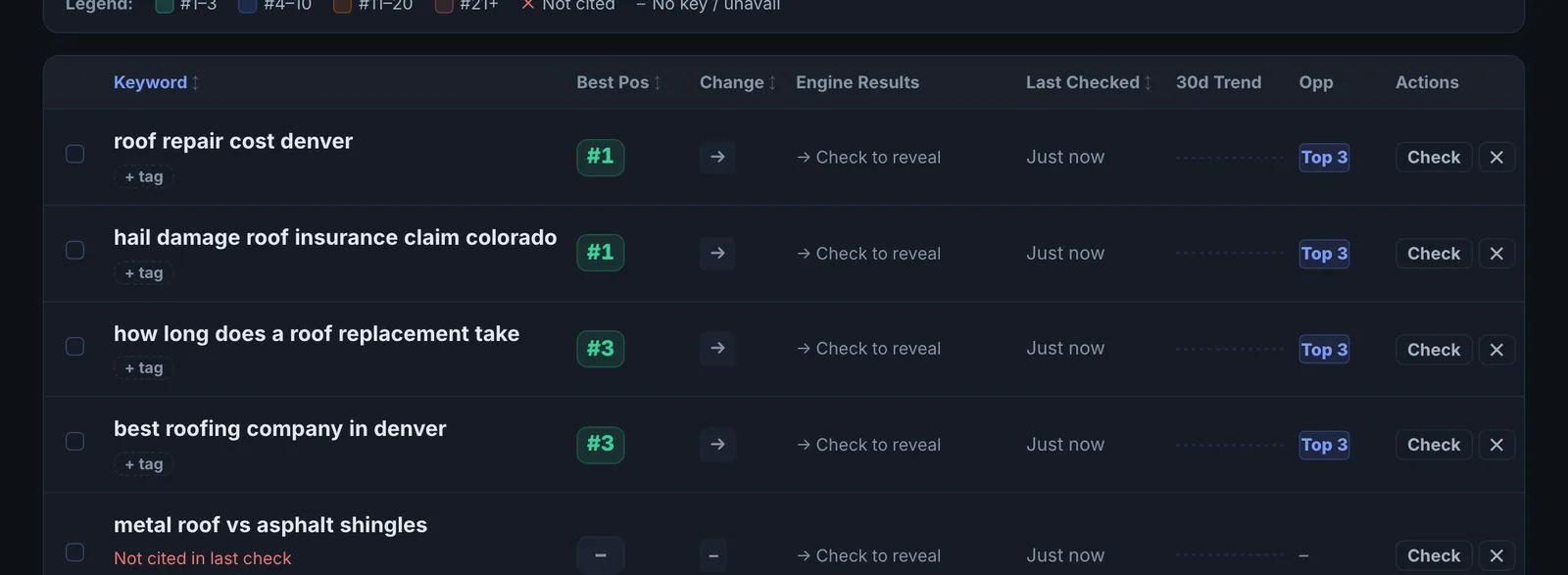
AI Rank Tracker keeps a list of keywords and records, for each one, your position among the sources each AI engine cites: Gemini, ChatGPT, Perplexity and Grok. Each check is saved, so you see movement keyword by keyword.
Step by step
- Open AI Rank Tracker #
Find it under AI Visibility, Track, in the left sidebar.
- Add keywords #
Enter a keyword and your domain and click Track keyword, or use Import keywords to add a list. If Search Console is connected, you can pull keywords from it.
- Tag them #
Add tags such as a product line or a client name so you can filter the list.
- Check them #
Use Check Now on one keyword, Check selected on several, or Refresh all. Each keyword checked is one AI engine check.
- Read the movement #
Use the deltas, the history chart and the heatmap to see which keywords and engines moved since the last check.
Why it matters#
In classic SEO you track a position for each keyword. In AI search the equivalent is your place among the sources an engine cites. Rank Tracker gives you that number per engine and keeps it over time, which is what you need to see whether a page change moved you from fifth source to first, or out of the answer altogether, and on which engine.
What it checks#
For every keyword checked, Rank Tracker asks four engines with live web search:
| Engine | What is recorded |
|---|---|
| Gemini (with Google Search) | Whether your domain is among the cited sources, and its position |
| ChatGPT (with web search) | The same |
| Perplexity | The same |
| Grok | The same |
It also records the best position across engines, the full source list, and the related searches Gemini ran to build its answer (its fan-out queries). Every check is saved to the keyword's history.
Reading the results#
- Best position is your highest placement on any engine. Use it as the headline, then look per engine.
- Deltas show movement since the previous check. One check's movement can be noise. Two in the same direction is a trend.
- The heatmap shows keywords against engines. A row that is cold across every engine is a content gap. A column that is cold is an engine-specific problem.
- Cited / Not Cited filters split the list into what to protect and what to win.
- Fan-out queries show what Gemini searched for to answer. If your page does not cover those sub-questions, that is usually why it is skipped.
Implementing the fixes#
| What you see | What to do |
|---|---|
| Not cited on any engine | You likely have no page that answers the keyword directly. Create or rework one page around that exact question. |
| Cited on Gemini only | Gemini leans on Google's index. ChatGPT, Perplexity and Grok draw on other sources and are more sensitive to third-party mentions. Earn mentions on the sites they cite (see the source list). |
| Cited but low (position 4 and below) | Put a direct, specific answer at the top of the page section, add the facts the higher sources have, and add the matching schema. |
| Dropped since last check | Check what changed on your page (a project note helps), then whether a new source appeared above you in the source list. |
| Gemini fan-out questions you do not cover | Add a short section for each one on the same page. |
Re-check the keyword after the page is recrawled, usually one to four weeks.
Worked example#
An agency tracks 20 keywords for an accounting firm on Pro.
The heatmap shows one cold row, "R&D tax credit accountant", where no engine cites the firm: the firm has no page on R&D tax credits. It also shows one cold column, Grok, where the firm is absent on 15 of 20 keywords while Gemini and Perplexity cite it on 12. The fan-out queries for the cold row include "R&D tax credit eligibility for software companies" and "how long does an R&D claim take".
The fixes: a new R&D tax credit page answering those fan-out questions directly, and, for Grok, more mentions on sites it cites often for the category (seen in the full source list). Two monthly checks later, the row has turned warm on Gemini and Perplexity, while Grok is still cold, which tells the agency the Grok gap is about authority, not content.
Best practice#
- Tag keywords by page or service so you can see which page each group depends on.
- Check on a fixed rhythm (for example the first week of each month) rather than daily. Answers vary, and every keyword checked uses an AI engine check.
- Export CSV for client reports.
Troubleshooting
You cannot add more keywords #
The app saysYour plan tracks up to … keywords in the Rank Tracker. Remove one to add another
Each plan tracks a set number of keywords. Remove a keyword you no longer need, or move up a plan.
The keyword is already tracked #
The app saysKeyword already tracked for this domain
Each keyword is tracked once per domain. Find it in the list with the search box.
Competitor comparison is refused #
The app saysCompetitor rank comparison requires an Agency plan
Comparing your positions with competitors' needs Agency, with up to 5 domains at once.
Positions jump between checks #
AI answers vary from one run to the next. Treat a single check's movement as noise and two in the same direction as a trend.
Not listed here? See Common problems for limits, checks, plans and pages that cannot be read.
Questions
How many keywords can I track? #
Are keywords checked automatically? #
What does position mean here? #
How is this different from Citation Tracker? #
Something here does not match what you see in the app? Tell us and we will fix the guide.