 Citerank
Competitor Prompt Finder: where ChatGPT recommends your competitor
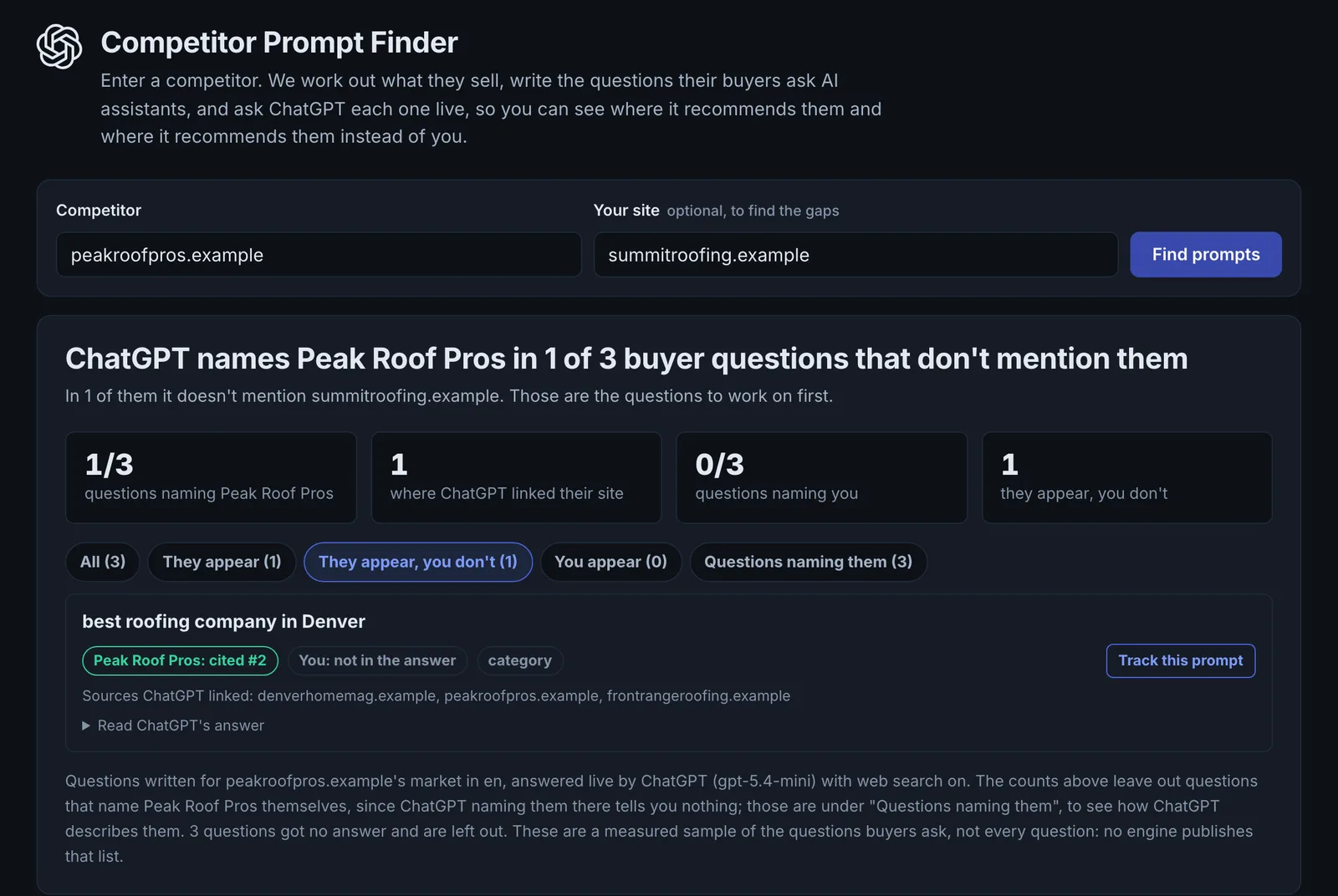
Competitor Prompt Finder reads a competitor's site, writes the questions a buyer in their market would ask an AI assistant, asks ChatGPT each one live, and records who it names and links. Add your site to see the questions where they are recommended and you are not.
Step by step
- Open Competitor Prompt Finder #
Find it under Competitors in the left sidebar.
- Enter a competitor #
Their domain.
- Add your site #
Optional, to find the questions where they win and you do not.
- Run it #
Between 5 and 20 questions are written (15 by default) and each asked of ChatGPT with web search forced on.
- Save the gaps #
Send the questions you lose to Prompt Library or Prompt Tracking.
Why it matters#
You can only track prompts you know about. This tool finds the questions where AI already sends buyers to a competitor: the conversations you are missing. Those are the prompts most worth tracking and the topics most worth winning.
What it checks#
- The competitor's home page: what they sell and in which language.
- Buyer questions for that market, written by an AI (category, comparison and problem questions).
- Each question asked of ChatGPT live with web search, recording who it names and links.
- With your site added, whether you are named for the same questions.
Reading the results#
- Recommended them, not you: your highest-value gaps.
- Recommended both: you are in the shortlist; work on position.
- Recommended neither: the question goes to others in the category.
- Intent tells you the stage: category, comparison or problem.
Implementing the fixes#
- Save the questions you lose into Prompt Tracking.
- For each, check the sources ChatGPT cited and get onto them (Off-Site Mention Gap).
- Make sure you have a page that answers the question directly, and compare it with the cited pages.
Worked example#
A CRM for real estate agents enters its main competitor's domain and its own.
The tool writes 20 buyer questions for that market and asks ChatGPT each one. Recommended them, not you: 8, mostly comparison questions ("best CRM for real estate teams under 10 agents"). Recommended both: 4. Neither: 8, which go to large general CRMs.
The 8 "them, not you" questions become the CRM's content plan. Each gets a page or a section that answers it directly, with team-size pricing in plain text. The questions are added to Prompt Tracking to measure the change monthly.
Best practice#
Run it on each main competitor once a quarter. Their prompt list tells you where they are investing.
Troubleshooting
ChatGPT could not be reached #
The app saysChatGPT is not reachable right now, so nothing was asked. Please try again later.
Nothing was asked. Try again later.
The questions could not be written #
The app saysWe could not write questions for this competitor just now. Please try again in a minute; you were not charged.
Usually the competitor's home page could not be read. Try again in a minute, or try the competitor's main product page.
You entered your own site as the competitor #
The competitor field must be another company's domain. Put your own domain in the "your site" field to see where you are named.
Not listed here? See Common problems for limits, checks, plans and pages that cannot be read.
Questions
Why not use an LLM mentions database? #
Which engine is asked? #
Does it use credits per question? #
Something here does not match what you see in the app? Tell us and we will fix the guide.