 Citerank
Schema Generator: build JSON-LD from what is on your page
The Schema Generator builds JSON-LD from the content of a page. It reads any schema already there, keeps every field and adds what is missing, uses your Business Profile for brand facts, and never outputs placeholder values.
Step by step
- Fill in your Business Profile #
In Settings, add your business details once (name, address, awards and so on). The generator uses them so you do not retype them for every page.
- Open Schema Generator #
Find it under Schema & Entities, Generate, in the left sidebar.
- Enter the page URL #
Paste the full URL of the page you want markup for.
- Choose a type #
Pick Auto to get the three types that fit the page best, or choose a specific type such as LocalBusiness, Product, Service, FAQPage, Article or HowTo.
- Copy or download #
Copy the JSON-LD or download it, and add it inside a script type=application/ld+json tag in the page head. Then validate the page.
Why it matters#
AI engines and Google read structured data to work out what a page is and who stands behind it. Good schema does not guarantee a citation, but missing or disconnected schema makes the engine guess, and guesses favour the competitor whose markup is clear. The Schema Generator writes correct, entity-linked JSON-LD from the page itself in a minute, keeps what you already have, and never ships placeholder values that Google would read as real.
What it checks#
- The page content: headings, body, FAQs and visible facts.
- Existing JSON-LD on the page, including @graph structures. It keeps every field you have and adds what is missing.
- Your Business Profile in Settings, for brand facts such as name, address and awards.
Types it generates: Auto (the three that fit best), LocalBusiness, FAQPage, Article, Product, Service, HowTo, Organization, Person, JobPosting, Course, Recipe, SoftwareApplication, Restaurant, medical, legal and professional services, ItemList, NewsArticle, Event, VideoObject, MobileApplication and DefinedTerm.
Reading the results#
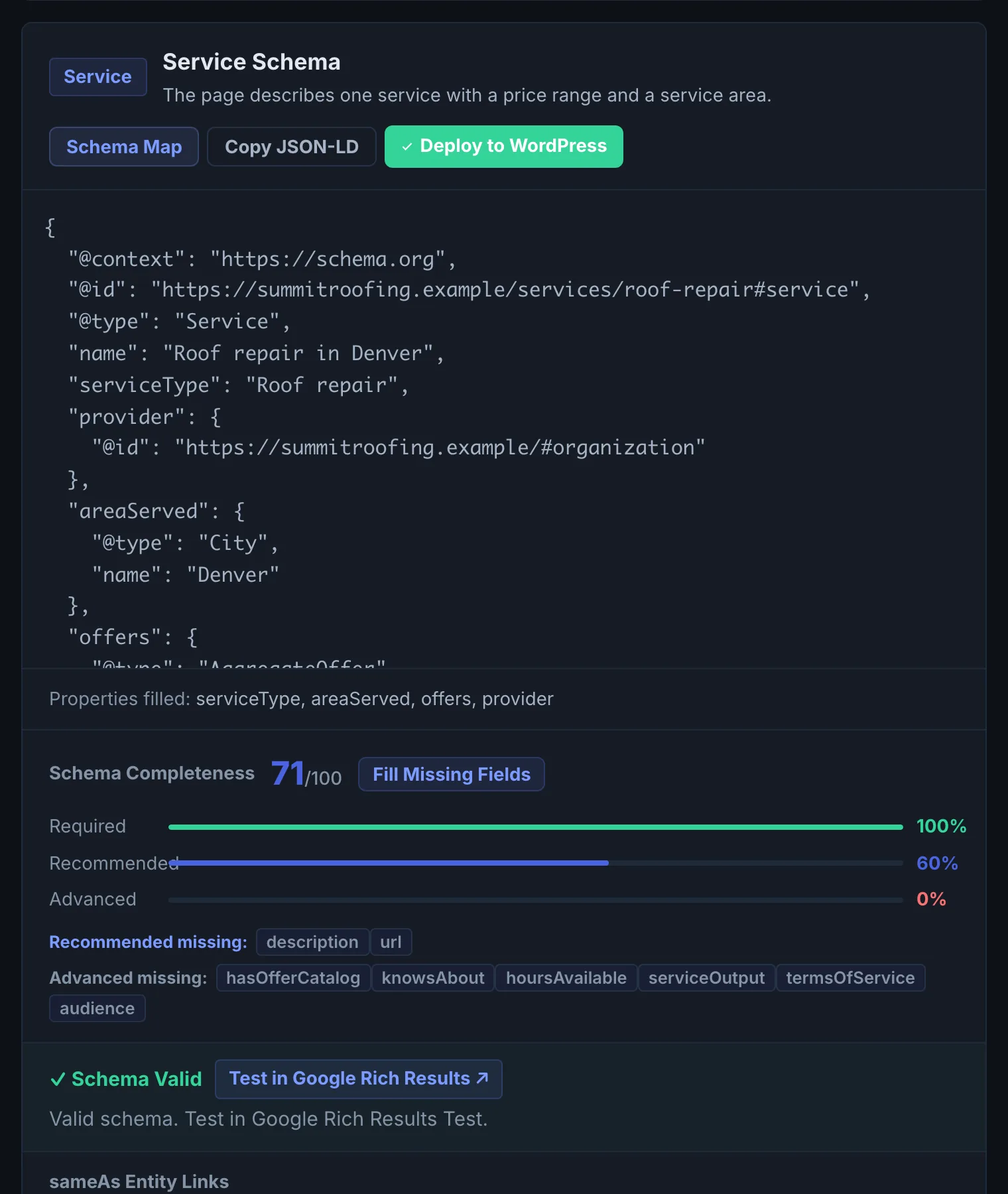
- The JSON-LD is ready to paste, with copy and download buttons.
- The schema map shows how the entities connect (which Organization provides which Service, on which WebPage).
- Missing fields are left out, not faked. If a field you expected is missing, the value was not found on the page or in your Business Profile. Add it there and regenerate.
Implementing the fixes#
- Fill in your Business Profile once, so every generated block carries correct brand facts.
- Generate per page type. Home page: Organization or LocalBusiness plus WebSite. Service pages: Service linked to your Organization. Product pages: Product with Offer. Articles: Article with author. Pages with real Q&A: FAQPage.
- Add it to the page inside a script tag with type application/ld+json in the head. On WordPress, Citerank Deploy can push it for you.
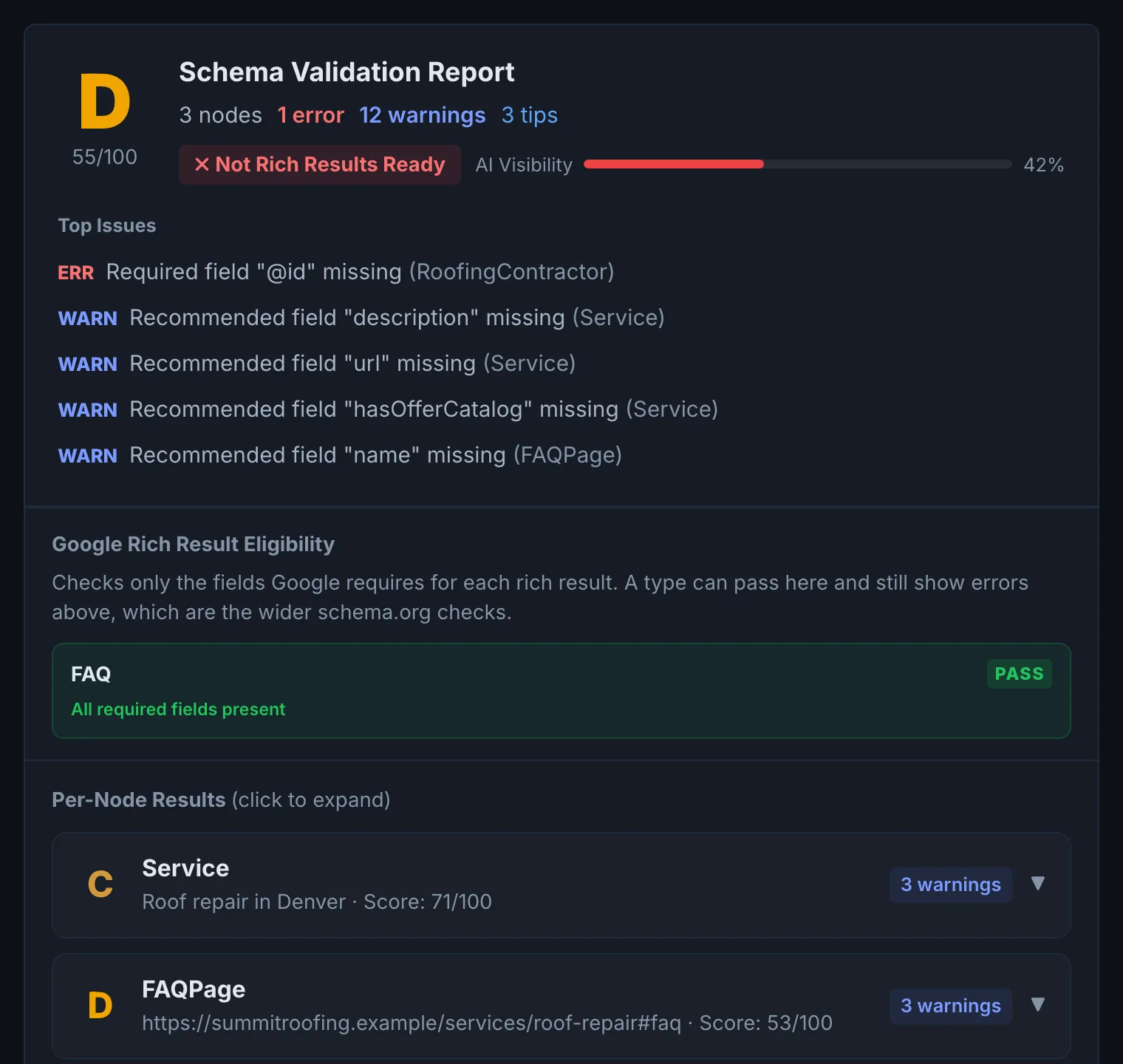
- Validate with the page's re-audit in the Page Auditor, which checks the schema is read, complete and linked.
- Roll it out site-wide with the Bulk Schema Generator, which works from a crawl and matches each page's type.
Worked example#
A plumber generates schema for https://example-plumbing.com/water-heater-repair with type Auto.
The page already has a basic LocalBusiness block from a plugin, with name and phone only. The generator keeps it and returns a @graph with:
{"@context": "https://schema.org", "@graph": [
  {"@type": "Plumber", "@id": "https://example-plumbing.com/#business",
   "name": "Example Plumbing", "telephone": "+1-503-555-0100",
   "address": {"@type": "PostalAddress", "addressLocality": "Portland", "addressRegion": "OR"},
   "areaServed": ["Portland", "Beaverton", "Gresham"]},
  {"@type": "Service", "@id": "https://example-plumbing.com/water-heater-repair#service",
   "name": "Water heater repair", "provider": {"@id": "https://example-plumbing.com/#business"}},
  {"@type": "FAQPage", "mainEntity": [{"@type": "Question", "name": "How long does a water heater repair take?",
   "acceptedAnswer": {"@type": "Answer", "text": "Most repairs take one to three hours."}}]}
]}
priceRange is left out because no price appears on the page or in the Business Profile. The plumber adds a price range to the profile in Settings, regenerates, pastes the result into the page head, and confirms it in Google's Rich Results Test.
Best practice#
- Keep one Organization node with a stable @id (for example https://example.com/#organization) and reference it from every page, rather than repeating a different Organization block on each one.
- Only mark up what is visible on the page. FAQ schema for questions that are not on the page is a policy risk.
- Use Schema Coverage to find pages still missing markup, and Schema Monitor to be told when markup breaks or disappears.
Troubleshooting
A field you expected is missing #
The generator only uses facts it finds on the page or in your Business Profile, and never invents them. Add the fact to the page or to Settings, Business Profile, then regenerate.
The page could not be fetched #
The page blocks the crawler or needs a login. Allow CiterankBot, or generate schema for a public page. See Common problems.
The output failed to generate #
The AI response could not be read as valid JSON-LD. Generate again. If it repeats, choose a specific type instead of Auto.
Google's test shows a warning on the generated schema #
Warnings are optional fields Google would like, such as image or priceRange. Errors must be fixed; warnings are worth fixing where you have the fact. Add it to the page or Business Profile and regenerate.
Not listed here? See Common problems for limits, checks, plans and pages that cannot be read.
Questions
Will it overwrite the schema I already have? #
Can it handle a site with many different page types? #
Why are some fields left out? #
Something here does not match what you see in the app? Tell us and we will fix the guide.