 Citerank
Smart Agents: AI agents that do citation work for you
Smart Agents are five AI agents that carry out citation work end to end: Citation Recovery, Page Optimizer, Competitor Leapfrog, Research to Article and Weekly Brief. Recipes chain them, and Portfolio runs across all your clients.
Step by step
- Open Smart Agents #
Find it under Agents & Commerce, Automate, in the left sidebar.
- Pick an agent #
Citation Recovery, Page Optimizer, Competitor Leapfrog, Research to Article or Weekly Brief.
- Fill in its inputs #
Domain, target keyword or page, competitor and keywords depending on the agent (3 to 6 test keywords for Leapfrog, 5 to 10 for the Weekly Brief).
- Run it #
Watch the agent work step by step.
- Review and apply #
Review the output before publishing or deploying anything.
Why it matters#
Diagnosis is only half the job. Smart Agents carry out the repeatable parts of citation work (finding the problem, researching the fix, drafting the content) so you spend your time reviewing rather than assembling.
What it checks#
| Agent | What it does | Inputs |
|---|---|---|
| Citation Recovery | Works out why you lost or never had a citation for a keyword and what to change | Domain, target keyword |
| Page Optimizer | Rewrites a page for the keywords you target | Page URL, target keywords |
| Competitor Leapfrog | Tests a competitor against you on chosen keywords and plans how to overtake them | Your domain, competitor, 3 to 6 keywords |
| Research to Article | Researches a topic and drafts an article built to be cited | Topic or target keyword |
| Weekly Brief | A briefing on your tracked keywords | Domain, 5 to 10 keywords |
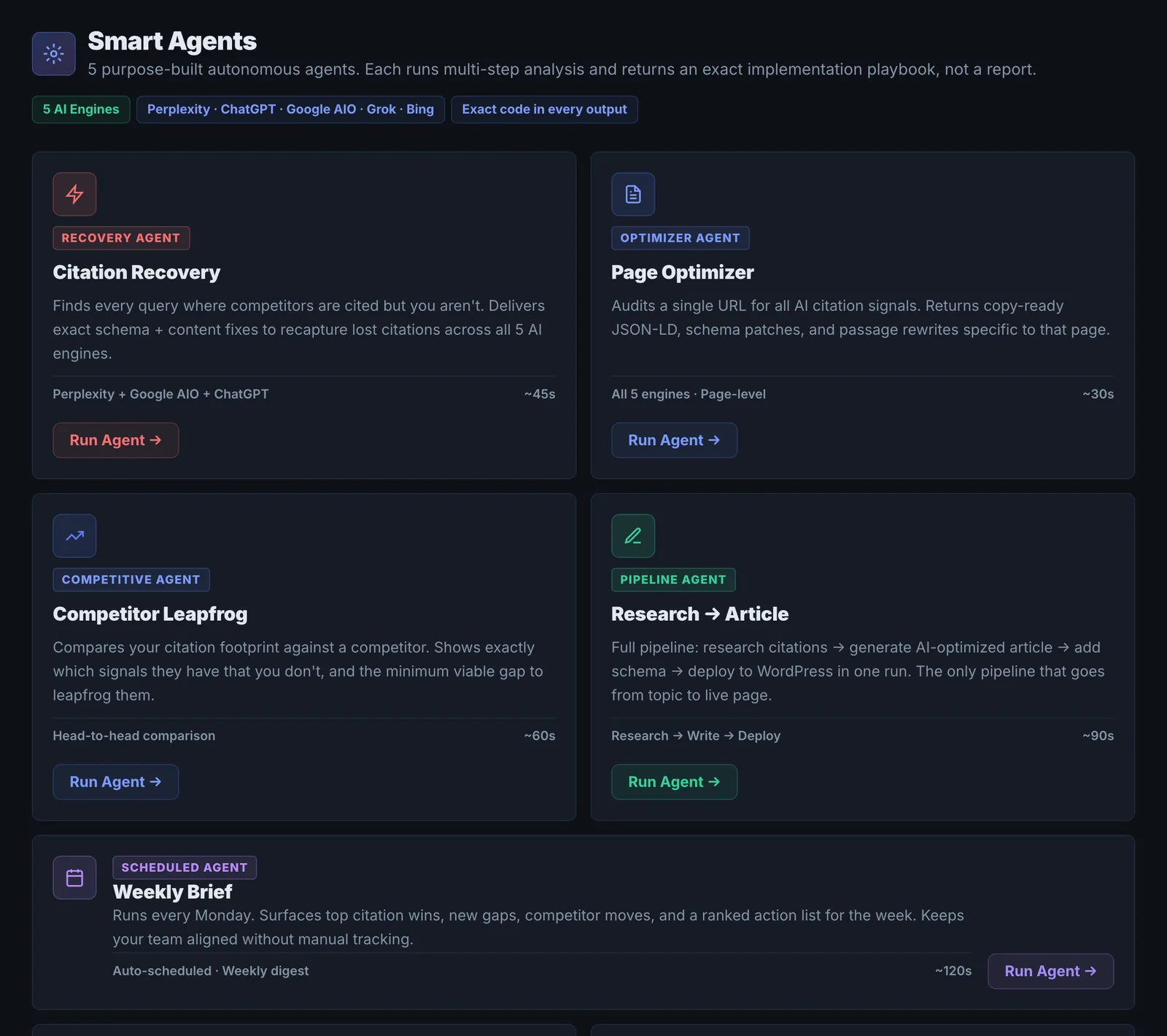
Recipes run agents in sequence; Portfolio runs across all your clients.
Reading the results#
Each run shows its steps, what it found and its output. Check the evidence each step used before trusting the conclusion.
Implementing the fixes#
Apply the recommended changes or publish the drafted content after editing, then measure with Prompt Tracking or Citation Tracker.
Worked example#
An agency runs Citation Recovery for a client that lost its AI Overview citation for "commercial roof inspection".
The steps: it confirms the citation is gone, finds the page now cited (a competitor's inspection checklist published last month), compares the two pages, and notices the client's page was cut in half in a redesign that removed its inspection steps. The output: restore the steps as a numbered list, add an inspection frequency table, and update the date. Each step shows the evidence it used.
The agency checks that evidence, makes the changes, and confirms the citation's return with Citation Tracker three weeks later.
Best practice#
Start with Citation Recovery on your most valuable lost keyword. Agents are among the more credit-heavy tools, so aim them at keywords that matter.
Troubleshooting
A run costs more credits than expected #
Agents run several steps, each with its own searches and AI calls, so a run uses about 15 to 70 monthly credits depending on the agent. Check your balance before running a recipe or a portfolio run across all clients.
A step's conclusion looks wrong #
Open the step and read the evidence it used. If the evidence is wrong (a page that did not load, an outdated result), run the agent again or check the step by hand with the matching tool.
The agent did not change the site #
Agents produce recommendations and content for you to review and approve. Publish the changes yourself once you have checked them.
Not listed here? See Common problems for limits, checks, plans and pages that cannot be read.
Questions
What does each agent cost? #
Do agents change my site on their own? #
Should I run agents on a schedule? #
Something here does not match what you see in the app? Tell us and we will fix the guide.