 Citerank
Citation Tracker: see which AI engines cite you
Citation Tracker asks the AI engines your keywords and records, for each one, whether your domain is cited, in what position, and who is cited instead. It turns that into a visibility score, share of voice and a list of opportunities.
Step by step
- Open Citation Tracker #
Find it under AI Visibility, Track, in the left sidebar.
- Enter your domain #
Type your domain, for example example.com.
- Add your keywords #
Enter one keyword or question per line. Leave the box empty and Citerank suggests keywords from your site. Each keyword is one AI engine check.
- Run it #
Run the tracker. Every keyword is checked on Google (for AI Overviews) and on each AI engine.
- Read the results #
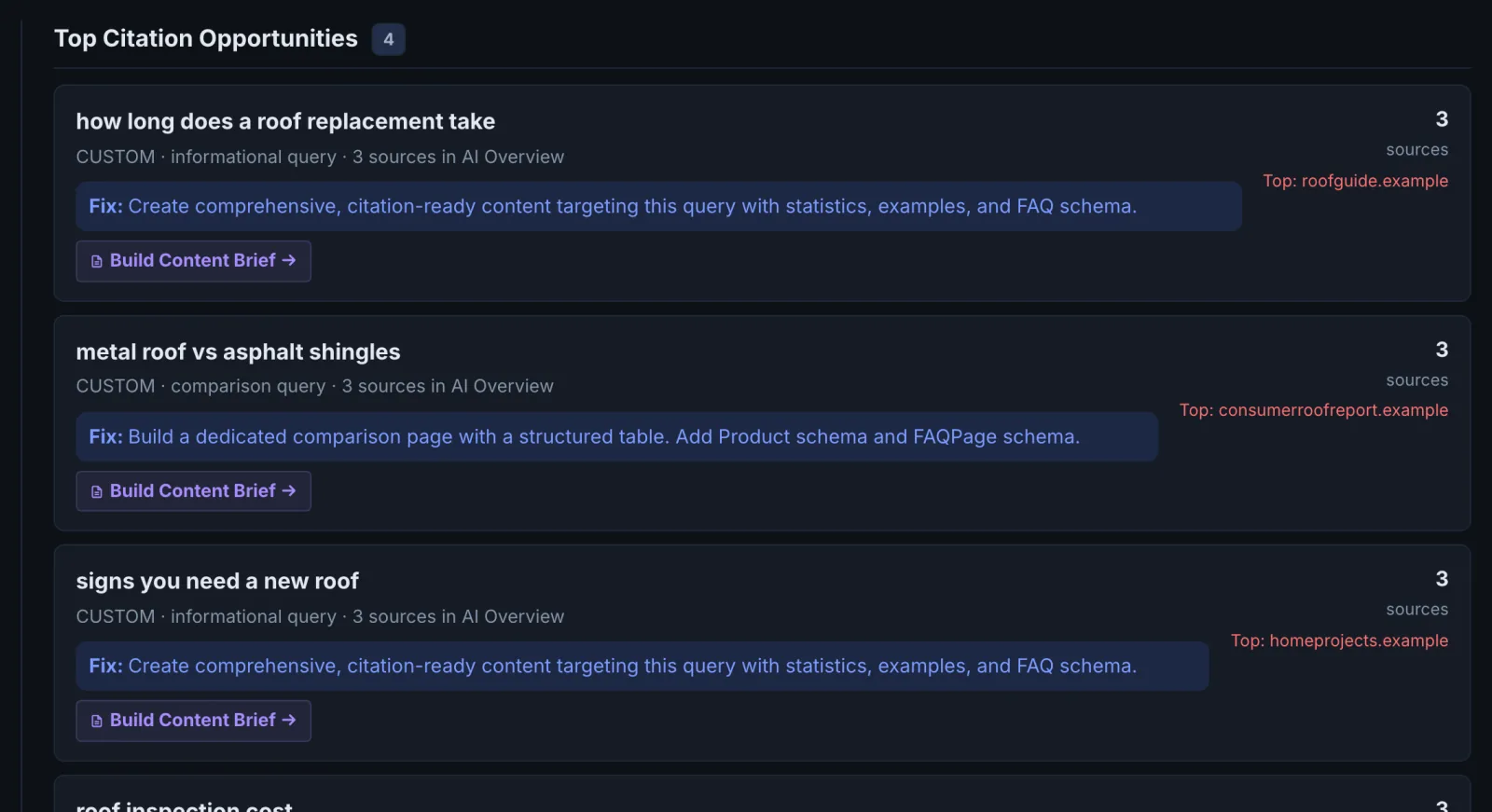
Start with the score summary, then the top citation opportunities, then the keyword-level results to see which competitor each engine cites instead of you.
Why it matters#
Ranking in Google no longer tells you whether you are in the answer. Citation Tracker asks the engines your buyers use the questions they ask, and records who each one cites. That turns "are we visible in AI search?" from a guess into a list: these keywords cite us, these cite a competitor, and here is which page wins. It is the tool for setting a baseline, proving a fix worked, and finding the keywords where a competitor wins with a page you can beat.
What it checks#
For each keyword, Citation Tracker:
- Runs a live Google search and records whether an AI Overview appears and which sources it cites.
- Asks Gemini, Perplexity, ChatGPT, Claude and Grok the same query and records whether your domain is cited and at what position.
- Records the competitors cited where you are not.
You can enter up to your plan's keyword limit per run (Starter 3, Pro 10, Agency 50; accounts on earlier terms keep 15, 25 and 100). Leave the box empty and it suggests keywords from your site.
Reading the results#
| Section | What it tells you |
|---|---|
| Score summary | An AI visibility score built from AI Overview coverage (up to 25 points), your share of voice (40% weight), your average citation position (up to 25 points) and citation quality |
| Citation intelligence | Which domains win your keywords across engines |
| Top citation opportunities | Keywords where you are close, or where a competitor wins with a page you could beat |
| Keyword-level results | Each keyword and engine: cited or not, position, and who was cited |
| AI engine intelligence | Your performance engine by engine |
| Velocity & trends | How your citations change between runs |
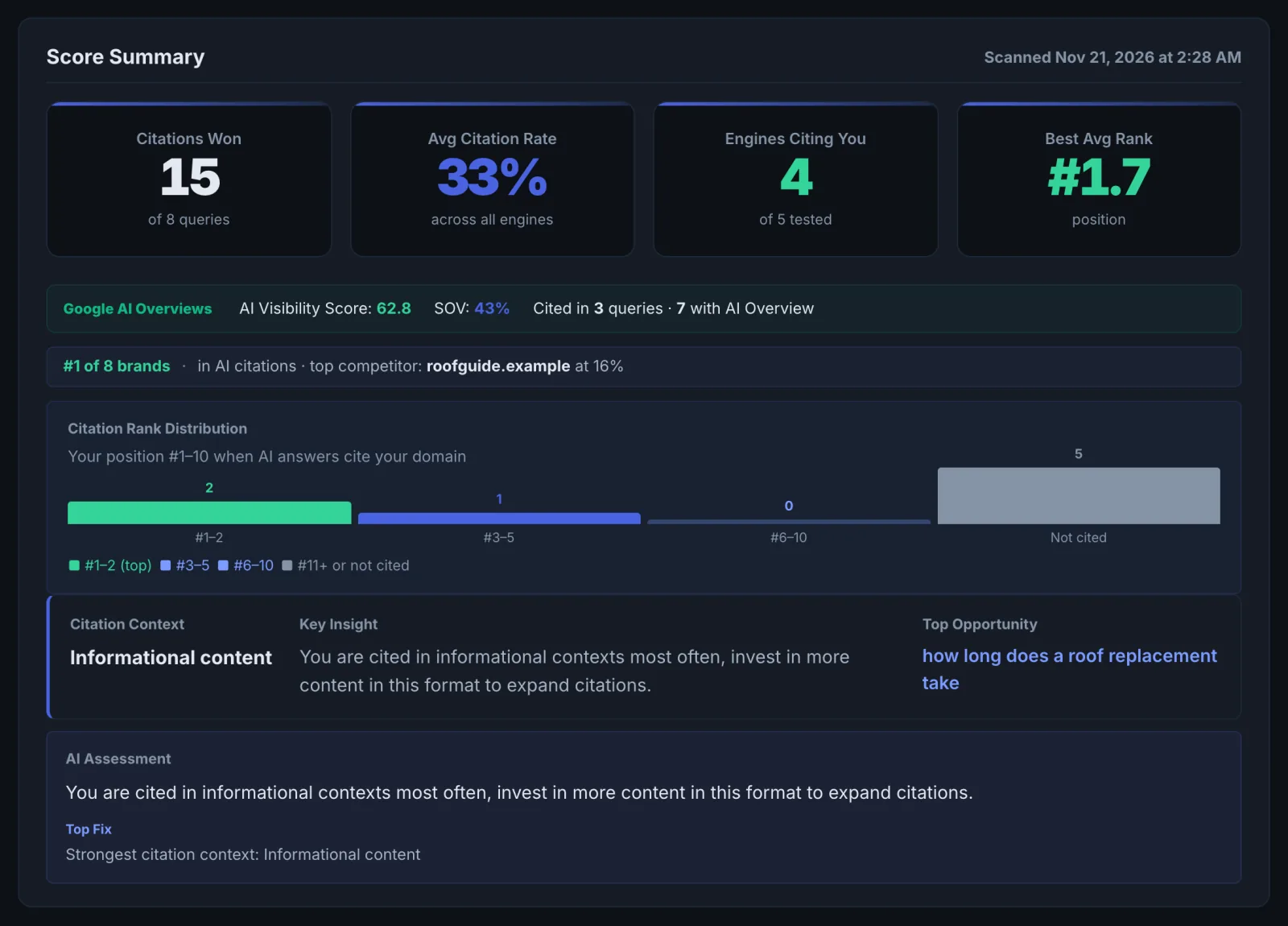
How to read it:
- Share of voice is the share of all citations across your keywords that point at you. It moves faster than the score and is the best single number to track.
- Position matters. Being the first source cited is worth far more than the sixth.
- Engines disagree. Each one searches and ranks sources differently. A keyword that cites you on Perplexity but not ChatGPT usually means your page is good but not in the index or sources ChatGPT prefers.
- Answers vary run to run. Trust trends over several runs more than one result.
Implementing the fixes#
- Pick the opportunity keywords where one competitor keeps winning.
- Open the winning page and note what it has that yours lacks: a direct answer in the first lines, a comparison table, specific numbers, an FAQ, schema, freshness.
- Audit your page for the same topic in the Page Auditor and fix rendering, schema and passage problems first.
- Close the content gap. Answer the exact question in the first two sentences of the relevant section, add the specifics the winner has, and keep facts consistent with your other pages.
- If you have no page for the keyword, that is the finding. Create one focused on that question.
- Re-run the same keywords two to four weeks after publishing. Engines take time to recrawl.
Worked example#
A Pro account tracks 8 keywords for a payroll software company.
- AI Overviews appear on 6 of the 8 searches. The company is cited on 1.
- Perplexity cites it on 4 keywords, ChatGPT on 1, Gemini on 2.
- Citation intelligence: a competitor's comparison page and a payroll glossary site win 5 of the 8 keywords across most engines.
- Top opportunity: "payroll for contractors". Perplexity cites the company at position 4, and the AI Overview cites a two-year-old forum thread.
The fix: the company's contractor payroll page gets a direct opening answer, a cost table and an FAQ section, and is linked from the pricing page. Four weeks later, a re-run shows the AI Overview for "payroll for contractors" citing the page, and share of voice across the 8 keywords up from 9% to 17%. The keyword then goes into Prompt Tracking so it is watched monthly.
Best practice#
- Use the words buyers use. Questions and comparisons ("metal vs asphalt roof") make better keywords than single words ("roofing").
- Mix the stages: problem, comparison and buying questions.
- Keep the list stable so the trend means something, and run it after meaningful site changes rather than daily. Every keyword is one AI engine check.
- For automatic monthly monitoring of a fixed list, use Prompt Tracking.
Troubleshooting
You are cited in ChatGPT when you ask it yourself, but the tracker says not cited #
AI answers change between runs, between accounts and with what the person asked before. The tracker asks each engine once, signed out, with live search, so it is a fair repeatable sample, not a copy of your own session. Judge by share of voice across keywords and runs, not one answer.
Your blog or shop is on a subdomain and is not counted #
Citations on any subdomain of the domain you enter count as yours, and www. is ignored. Enter the main domain (example.com), not a subdomain (blog.example.com), or only that subdomain is counted. A different domain ending (example.co.uk and example.com) is a different site: run each.
The run needs more checks than you have #
The app saysThis run checks … prompts or keywords and
Each keyword is one check. The message shows how many the run needs, how many plan checks are left and your pack credits. Run fewer keywords, wait for the reset date shown, or buy a pack from Settings. See Common problems.
No AI Overview appears for your keywords #
Google shows AI Overviews on some searches only, and often not on short commercial or local ones. That is a finding, not an error: those keywords are still decided by the classic results and the other engines. Add question-style keywords ("how much does … cost") to see AI Overview coverage.
Not listed here? See Common problems for limits, checks, plans and pages that cannot be read.
Questions
How many keywords can I run at once? #
Why do different engines give different answers? #
What is the difference between Citation Tracker and Prompt Tracking? #
Something here does not match what you see in the app? Tell us and we will fix the guide.