 Citerank
API and MCP: use Citerank from Claude, Cursor and your own code
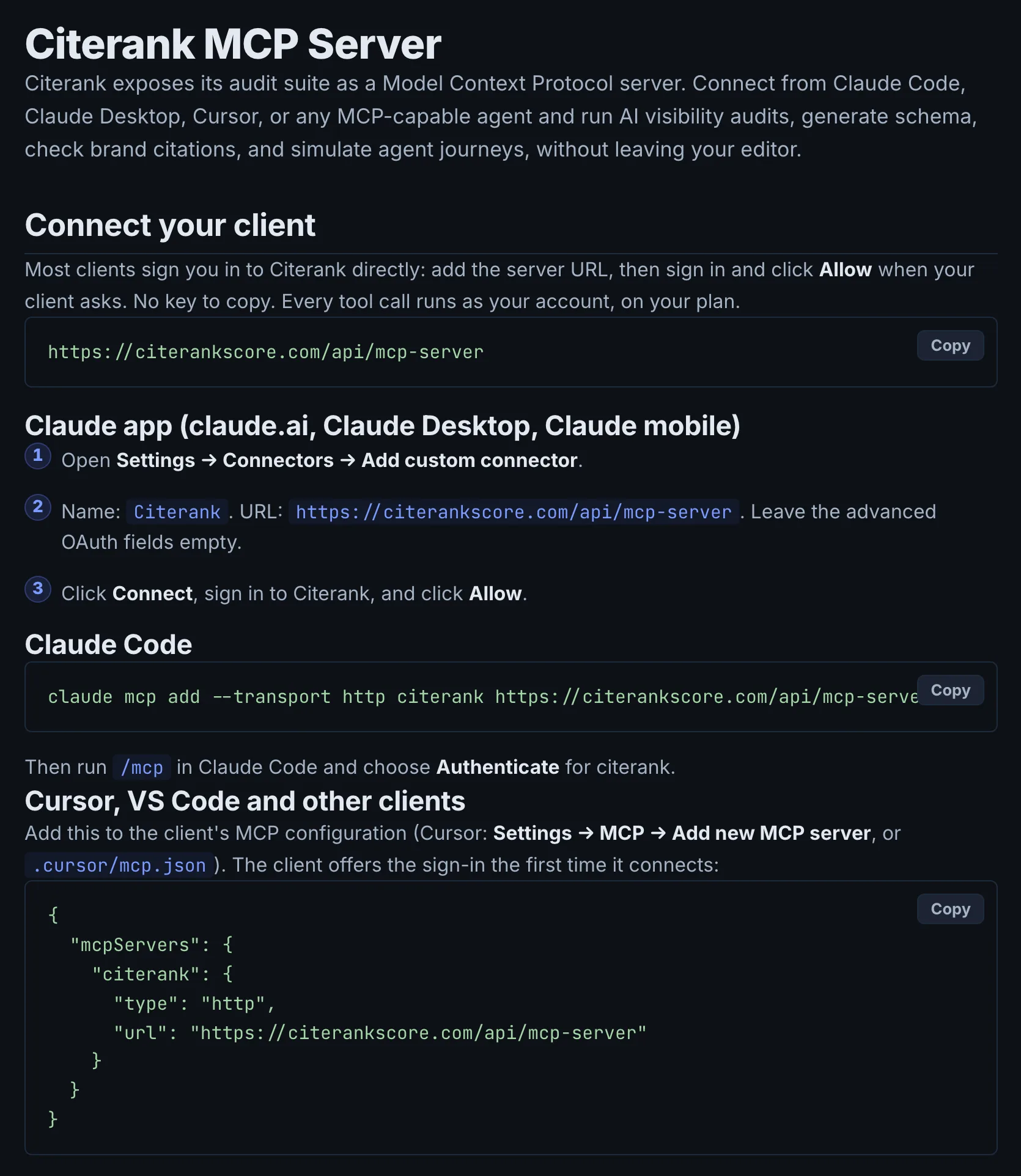
Citerank runs an MCP server, so Claude (app, Desktop, mobile and Claude Code), Cursor, VS Code and other MCP clients can run its tools from a chat or your IDE. A REST API returns AI visibility scores for any domain, with examples for Node.js, Python, Google Sheets and Looker Studio.
Step by step
- Open API & MCP Docs #
Find it under Settings in the left sidebar.
- Connect your client #
Follow the steps for the Claude app, Claude Code, or Cursor and VS Code. Or create an API key and use that instead.
- Check it works #
Ask your assistant to run a Citerank tool, for example "Use citerank to audit example.com and tell me the top 3 things blocking it from being cited in AI Overviews."
- For the REST API #
Create an API key in Settings and call the endpoints in the API reference at /docs/api.
- Manage access #
Revoke keys or connected clients when you no longer need them.
Why it matters#
If your team already works in Claude or an IDE, Citerank can come to them: "audit these five pages and generate schema for the weakest" becomes one request. The REST API puts scores into your own dashboards and client reports.
What it checks#
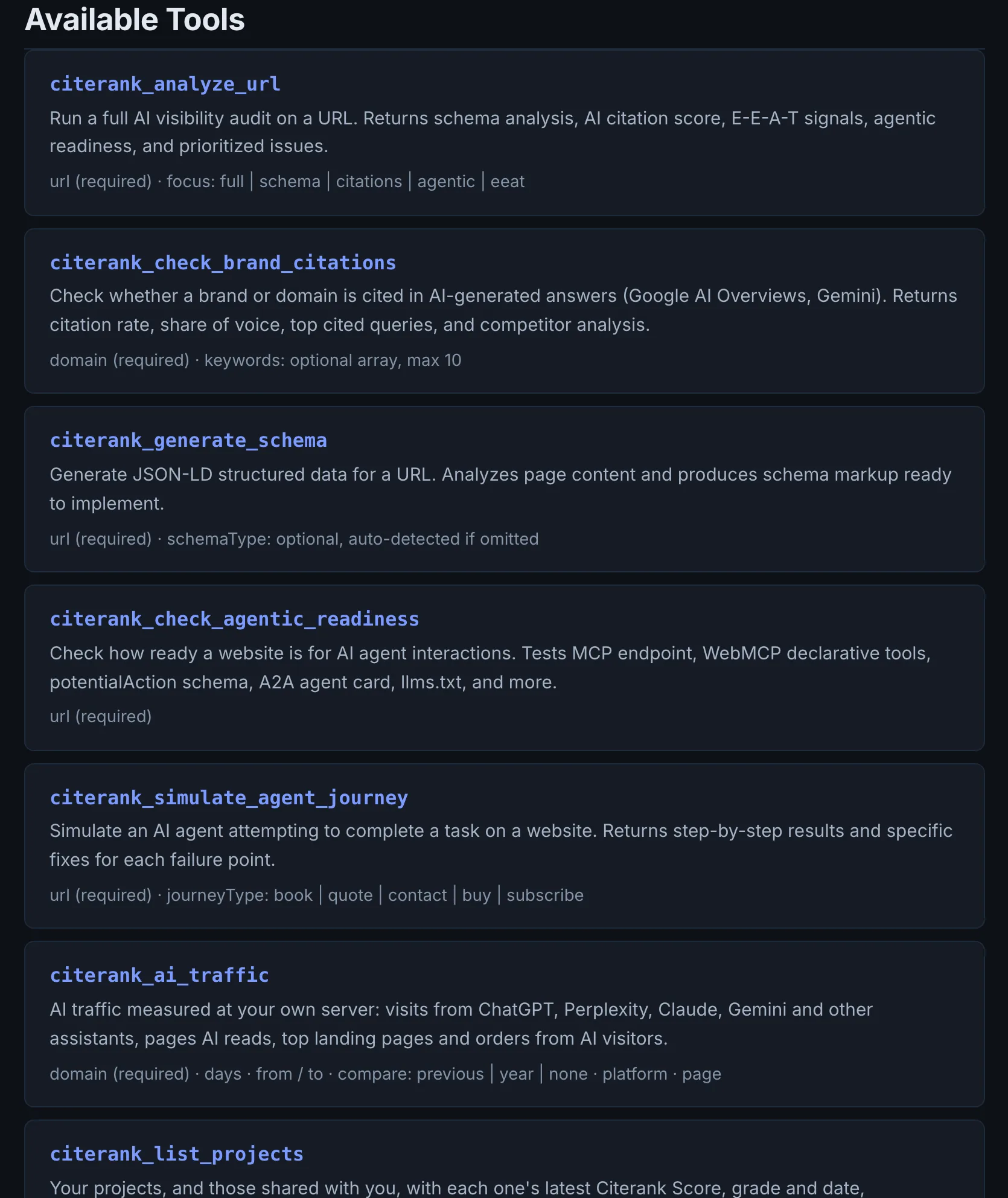
The MCP server exposes Citerank tools, including page analysis, schema generation, brand citation checks, agentic readiness, schema deployment and the agent journey simulation. The REST API returns AI visibility scores and dimension scores for domains.
Reading the results#
Your assistant shows the tool output and can summarise it. API responses are JSON; the reference at /docs/api lists every field and dimension key.
Implementing the fixes#
- Ask the assistant to chain steps: audit, generate schema for the gaps, then deploy with citerank_deploy_schema on a connected site.
- For reporting, pull scores into Google Sheets (IMPORTDATA) or Looker Studio with the community connector, or use the multi-domain agency report example.
Worked example#
An agency strategist connects Citerank's MCP server to Claude, creates an API key in Settings, and asks:
"Analyse https://client.example/services/roof-repair for AI visibility and give me the three fixes with the biggest impact."
The assistant calls the page analysis tool, reads the result and answers with the three fixes, citing the findings. The strategist follows up: "Generate schema for that page and deploy it." The assistant calls schema generation, shows the JSON-LD for review, and after approval calls the deploy tool, which writes it to the client's connected WordPress site.
Separately, the agency's reporting script calls the REST API each month for each client domain's AI visibility score and dimension scores, and writes them into its own dashboard.
Best practice#
Create a separate API key per integration so you can revoke one without breaking the others.
Troubleshooting
The daily MCP allowance is used #
The app saysMCP tool calls for the last 24 hours on the … plan. Calls become available again as the oldest ones pass 24 hours.
Each plan has a number of MCP tool calls per 24 hours, counted on a rolling basis. Calls free up as the oldest ones pass 24 hours. Ask your assistant to batch questions so it makes fewer calls.
Too many calls in a minute #
The app saysToo many MCP tool calls in the last minute. Wait a minute before the next call.
Wait a minute. Assistants sometimes call tools in quick loops; ask for one result at a time.
Deploying schema fails #
The app saysNo WordPress site connected. Connect a site at https://citerankscore.com/wp-integration.html
Deploying needs a connected site. Connect it in Citerank Deploy, then ask again.
The schema type you asked for was not used #
The app saysis not a supported type, so the best types for the page were chosen.
The message lists the supported types. Ask for one of them, or let the tool choose.
Not listed here? See Common problems for limits, checks, plans and pages that cannot be read.
Questions
Do MCP calls cost more than using the site? #
What is the daily MCP allowance? #
Which tools need which plan? #
How many API keys can I create? #
Something here does not match what you see in the app? Tell us and we will fix the guide.