 Citerank
Prompt Tracking: monitor the questions buyers ask AI
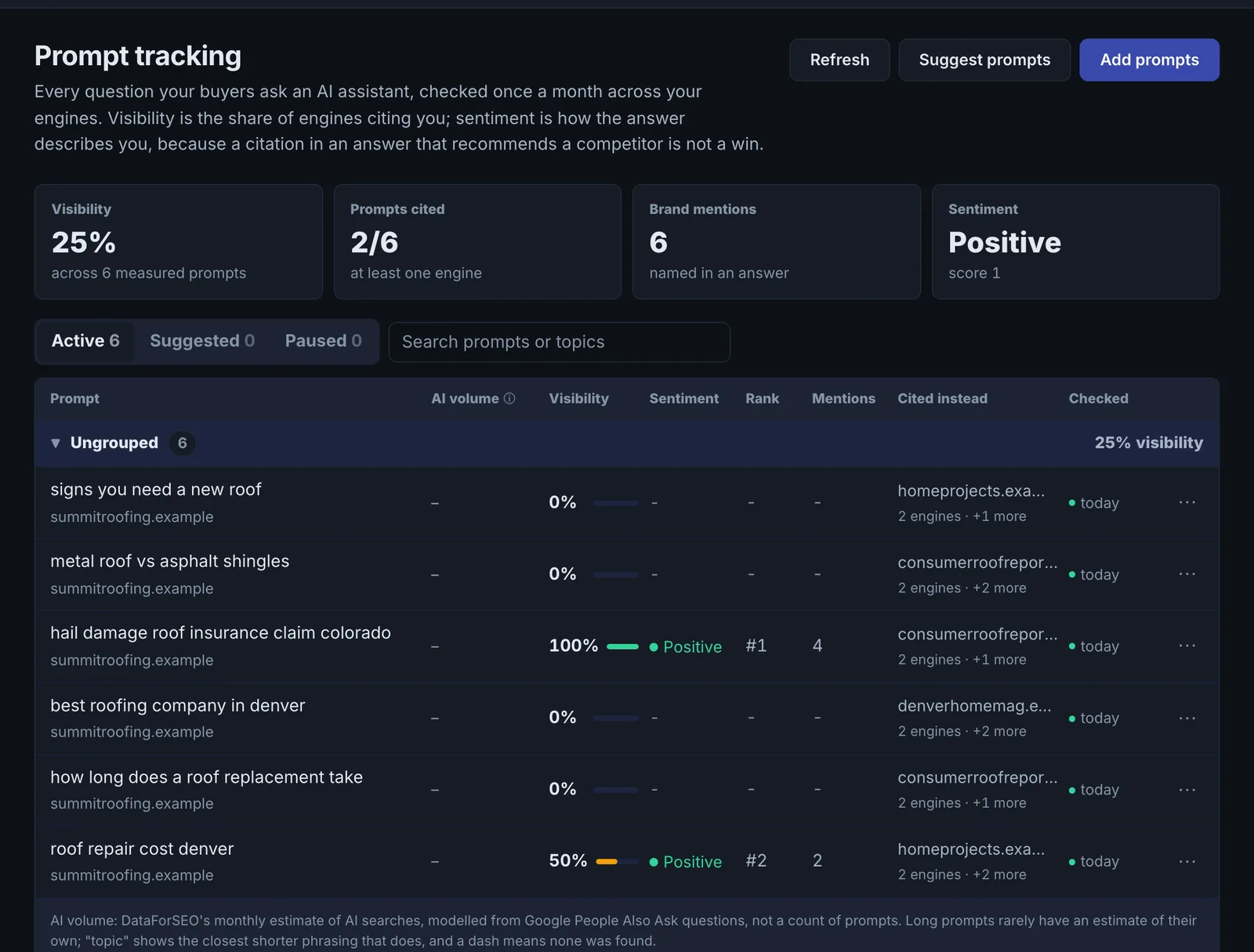
Prompt Tracking keeps a list of the questions your buyers ask AI assistants and checks each one automatically every month. For every prompt it reports whether you are cited and mentioned, how you are described, your rank, who is cited instead and which way it is moving.
Step by step
- Open Prompt Tracking #
Find it under AI Visibility, Track, in the left sidebar.
- Add prompts #
Click Add prompts and enter the questions your buyers ask, or click Suggest prompts to get suggestions for your site. Suggestions wait in the Suggested list until you accept them.
- Group them by topic #
Prompts are grouped by topic, so you can read visibility for each product or service line.
- Let the monthly checks run #
Each active prompt is checked automatically once a month. You do not need to do anything.
- Check now after a change #
After you publish a fix, use check now on the affected prompts to measure it straight away. Each check now uses one AI engine check.
Why it matters#
Buyers now ask assistants for recommendations and act on the shortlist. Prompt Tracking keeps the questions that matter to your business under watch every month, without you remembering to run anything, and reports more than "cited or not": whether you are named, how you are described, and who wins instead. That is what lets you prioritise work by revenue topic and prove progress month over month.
What it checks#
- Each active prompt is checked automatically once a month. Every scheduled check asks ChatGPT, and Gemini by default.
- Check now runs a prompt immediately (one AI engine check).
- Prompts can be switched to weekly. Checks between the monthly ones are paid from pack credits (6 credits each, about 20 a month per weekly prompt).
- Suggest prompts proposes prompts for your site. They wait in the Suggested list until you accept them.
- Results are written to a daily history, which also feeds SOV History.
Reading the results#
| Column | What it means |
|---|---|
| Visibility | The share of the tracked engines that cite you. The headline number |
| Mentions | How often you are named in the answer, linked or not |
| Sentiment | How the answer describes you. Being cited in an answer that recommends a competitor is not a win |
| Rank | Your best position across the engines that cited you |
| Rival | Who is cited instead of you. This tells you what to do next |
| Trend | The direction since the previous check |
| Freshness | How old the measurement is |
- Mentioned but not cited means the engine knows you but sources its answer elsewhere. Work on the page that should be the source.
- Cited with negative sentiment is a reputation problem, not a visibility problem. Read the answer and find the source of the claim.
- The same rival across many prompts is your real AI-search competitor, whoever you think your competitors are.
Implementing the fixes#
- Group by topic and start with the topic closest to revenue.
- For each prompt the rival wins, open the page cited for them, compare it with your equivalent page in the Page Auditor, and close the gap: direct answer first, specifics, comparison tables, schema.
- For prompts where you are not mentioned at all, you likely lack a page or third-party mentions on the topic. Check Off-Site Mention Gap for where competitors are mentioned and you are not.
- For negative sentiment, fix the underlying facts on your own site first (pricing, features, reviews), then the third-party pages engines quote.
- Use check now on the affected prompts after you publish, then let the monthly checks show whether it holds.
Worked example#
A law firm adds 12 prompts, such as "best employment lawyer in Denver for wrongful termination".
After the first monthly check: visibility 2 of 12 prompts. On 7 prompts the firm is mentioned but not cited: ChatGPT names it from memory but builds the answer from a legal directory and a competitor's blog. The same rival appears on 9 prompts.
The fixes: the firm's practice pages each get a direct answer to the prompt's question, the attorneys' bios get credentials and bar numbers, and the firm completes its directory profiles (the sources the engines cite). Three months later, SOV History shows visibility at 6 of 12, with the change event lined up one month before the rise.
Best practice#
- Write prompts the way people talk to an assistant: "What's the best accounting software for a 10-person agency?" not "accounting software agency".
- Cover the journey: problem, solution, comparison (including competitor names) and brand prompts.
- Start with 10 to 20 prompts that matter. Each monthly check uses one AI engine check from your plan.
Troubleshooting
A prompt shows no results yet #
New prompts wait for the next monthly check. Use Check now to measure one immediately: it uses one AI engine check.
Weekly checks are not offered #
The app saysWeekly checks are not available on your account yet.
Weekly checks are an add-on paid from pack credits, and are not open on every account yet. Monthly checks are included on every plan that has Prompt Tracking.
Suggest prompts produced nothing #
The app saysNo suggestions were produced
The site did not give enough to suggest from: the pages could not be read, or they say little about what the business does. Add prompts by hand, written the way a buyer would ask an assistant.
Results show the engines could not be reached #
The app saysThe AI engines could not be reached just now. Please try again in a few minutes.
Nothing was measured on that run. Try again in a few minutes.
Not listed here? See Common problems for limits, checks, plans and pages that cannot be read.
Questions
How often are prompts checked? #
Which engines does it check? #
What happens when my checks run out? #
Why is being mentioned different from being cited? #
Something here does not match what you see in the app? Tell us and we will fix the guide.