 Citerank
Fan-Out Mapper: map a keyword's AI fan-out and your page coverage
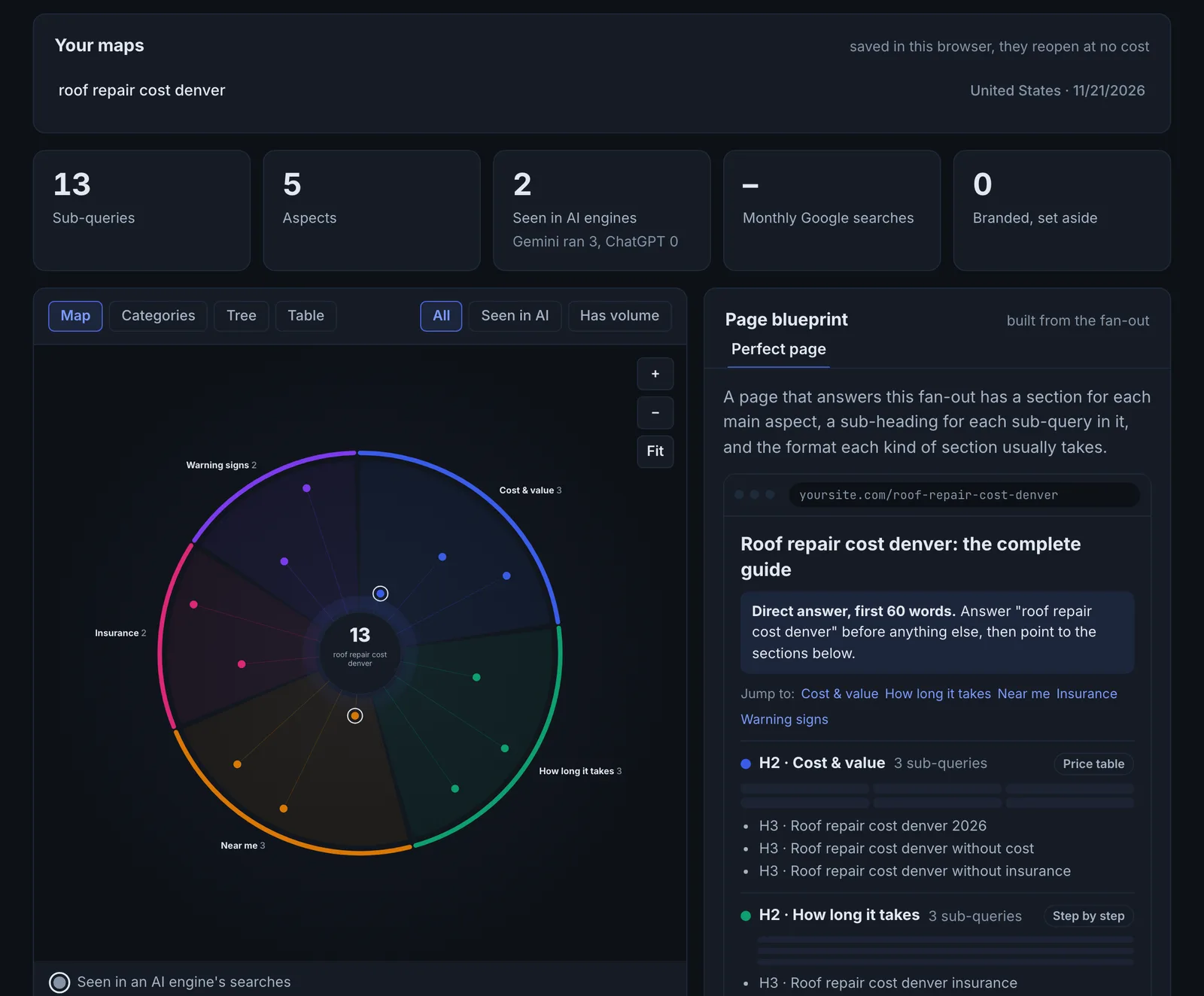
Fan-Out Mapper builds an evidence-based map of the sub-queries behind a keyword: the searches Gemini and ChatGPT actually ran, related Google searches with monthly volume, and autocomplete. It groups them by aspect, then checks which ones your page, and a competitor's, answer.
Step by step
- Open Fan-Out Mapper #
Find it under Content, Research, in the left sidebar.
- Enter a keyword and country #
Choose where the searches come from.
- Build the map #
Sub-queries are collected from four sources and grouped by aspect, with branded searches set aside.
- Check your page #
Enter your page URL, or upload a saved .html file (up to 3 MB), and optionally a competitor page, to see which sub-queries each covers.
- Use the blueprint #
Follow the page blueprint to add sections for the uncovered aspects.
Why it matters#
Covering the fan-out is how a page becomes the source an engine needs for most of its answer. The Mapper goes beyond a list: it shows how the sub-queries group into aspects, how much real search volume sits behind them, and exactly which ones your page and your competitor's page answer. That turns into a section-by-section blueprint.
What it checks#
| Source | What it adds |
|---|---|
| Gemini | The Google searches Gemini ran while answering the keyword with search on |
| ChatGPT | The searches ChatGPT ran (web search forced on) |
| Related searches | Related Google searches with monthly volume (DataForSEO) |
| Autocomplete | Google Autocomplete for the keyword and common modifiers |
Sub-queries are grouped by aspect. Coverage mode checks each sub-query against your page and an optional competitor page.
Reading the results#
- Sub-query map: every sub-query, its aspect and the sources that saw it ("Seen in"). Seen by several sources means strong evidence.
- Coverage by aspect: how much of each aspect your page answers, side by side with the competitor.
- Page blueprint: a mock-up of the sections a complete page would have.
- Branded searches set aside: sub-queries naming a brand, kept apart so they do not distort the plan.
Implementing the fixes#
- Add a section for each aspect your page does not cover, starting with the aspects with the most sub-queries.
- Use the sub-queries as section headings or FAQ questions.
- Where the competitor covers an aspect and you do not, that is likely why they are cited.
- Re-run coverage after publishing to confirm.
Worked example#
An outdoor retailer maps "best hiking boots for wide feet", then checks its buying guide in coverage mode with a competitor's guide.
Sub-query map: 46 sub-queries in 6 aspects: fit and sizing, brands, waterproofing, break-in, price, women's options. "Wide toe box" and "how to measure foot width" are seen by all four sources. Coverage by aspect: the retailer covers brands and price well, fit and sizing 30%, women's options 0%. The competitor covers fit at 80%.
The fix: the guide gets a fit and sizing section (how to measure width, what "2E" and "4E" mean, brands that run wide) and a women's section, following the page blueprint's order. Coverage re-check: fit 85%, women's 70%.
Best practice#
Build the map before writing a page, and keep it (Your maps) to refresh pages later.
Troubleshooting
The keyword is refused #
The app saysEnter a keyword of 2 to 120 characters.
Enter a keyword between 2 and 120 characters.
The page could not be checked #
The app saysThat address is not an HTML page.
The address is a PDF, image or file. Enter the web page. For a page that blocks crawlers, save it from your browser and upload the file instead (up to 3 MB).
The saved file is too large #
The app saysThat file is larger than 3 MB.
Save the page as "HTML only" rather than "complete", which leaves out the images.
Not listed here? See Common problems for limits, checks, plans and pages that cannot be read.
Questions
Is this the exact fan-out an engine uses for a person? #
Why upload a saved page? #
Does it use checks? #
Something here does not match what you see in the app? Tell us and we will fix the guide.